Features grew without workflow
Screens were added one by one, and now users cannot tell what to do next.
 Get Project Plan
Interface & Product Design
We design SaaS screens, portals, dashboards, admin panels, mobile app flows, wireframes, states, and developer-ready interfaces around real user workflows.
Who this is for
Interface and product design helps SaaS teams, portals, dashboards, admin systems, and apps become easier to understand, use, and build.
Screens were added one by one, and now users cannot tell what to do next.
Customers, staff, partners, and admins see flows that do not match their jobs.
Loading, empty, error, success, disabled, and edge states were not designed, so the product feels unfinished.
Designs lack rules, components, responsive behavior, or handoff details.
What is included
This service defines flows, wireframes, UI screens, states, responsive behavior, and developer handoff.
We map users, jobs, permissions, entry points, and success paths.
We design information hierarchy before the visual layer.
Core screens, components, and states are designed for real product use.
Screens are prepared with behavior notes, responsive rules, and reusable patterns.
Tell us what exists now, what result you need, and what blocks progress. We will reply with the practical scope and next step.
Choosing the right scope
Structure and flow should come before visual polish.
Once behavior is clear, visual hierarchy and components can be finalized.
Existing products need audit, workflow repair, and state design before surface polish.
Pricing
Product design cost depends on number of roles, flows, screens, states, responsive needs, and handoff depth.
More user types and task paths add design and logic work.
A focused dashboard is smaller than a full SaaS product or portal.
Loading, empty, error, success, and permission states add quality and scope.
Developer notes, component rules, and responsive specs add implementation clarity.
Proof
Good interface design makes the workflow clearer for users and the build clearer for developers.

Search to sale
SaaS product
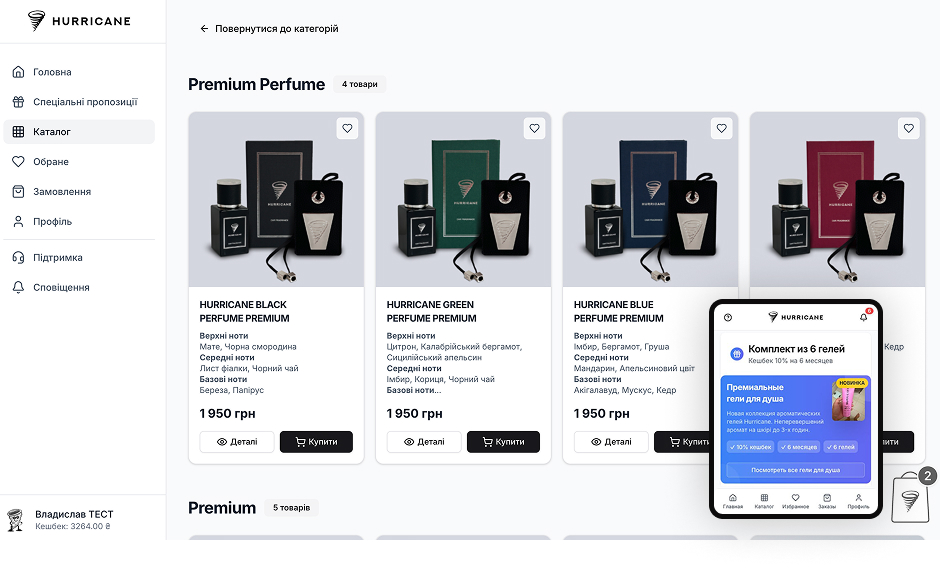
Connected commerce
What happens after you reach out
Roles, workflows, permissions, data, and business goals define the product structure.
Wireframes and screen maps confirm behavior before visual design.
Dashboards, tables, forms, navigation, and states are designed.
Empty, loading, errors, permissions, and mobile behavior are clarified.
Designs move to your developers or our custom software team.
Next step
Send the product, user roles, and workflow problem. We will reply with the right product design scope.
FAQ
Yes. SaaS flows, dashboards, admin panels, subscriptions, and onboarding can be designed.
Yes. We can audit workflows, hierarchy, states, and user roles before redesigning.
Yes. Wireframes are useful when workflow and structure need to be clarified first.
Yes. Handoff can include responsive behavior, component notes, and state details.
Yes. This connects directly with custom software and mobile app development.
Yes. Mobile app flows and screens can be included when the product needs iOS or Android.
Keep exploring
Service pages, trust, forms, CRM routing, and analytics built into the website from day one.
Focused campaign pages for one offer, one audience, and one measurable action.
Portals, dashboards, APIs, admin panels, and workflows when the business needs its own system.
Interface and Product Design in Utah & across the US
Interface and product design makes complex software usable: SaaS products, customer portals, dashboards, admin panels, and mobile apps designed around real user workflows. Otherwise Solutions designs product interfaces for teams in Utah and across the United States, starting from roles and tasks — never from screens.
The discipline shows in the unglamorous parts: empty states, loading states, errors, permissions, and responsive behavior. Products feel unfinished exactly where those states were never designed.
The typical client is either building a first product — a SaaS founder, a business replacing spreadsheets with a portal — or maintaining one that grew feature by feature until users started getting lost. Both get the same method: workflows mapped first, structure settled in wireframes, and visual design applied to screens whose logic is already proven.
Product design that ignores implementation creates expensive translation problems. Ours moves straight into custom software development or mobile app development — the same team logic behind Blogent, a SaaS AI platform we designed and built end to end, and Hurricane, where the store, mobile apps, and admin tooling share one design system.
The patterns repeat across SaaS products and internal tools: features were added one release at a time and navigation no longer matches how anyone works; the dashboard shows everything and therefore communicates nothing; new users churn during onboarding because the first session has no obvious success path; admin and customer views share layouts that fit neither; and support tickets cluster around the same three screens. Each of these is a workflow problem wearing a visual disguise — which is why the fix starts with flows, not with a fresh coat of UI.
Existing products get an audit first: where users stall, which flows do not match jobs, which states are missing. Workflow repair comes before surface polish — a beautiful interface on a confusing flow just makes the confusion faster. The audit produces a prioritized redesign scope, so improvement can ship in stages instead of waiting for a big-bang relaunch.
Product interfaces get used on whatever screen the work happens on — a dashboard checked from a phone, a portal opened on a tablet at a job site. Responsive behavior is therefore designed per component, not left for developers to improvise. The same applies to accessibility basics: contrast that survives sunlight, touch targets sized for thumbs, focus states for keyboard users, and tables that degrade into something readable on small screens. These decisions cost little at design time and a sprint each when retrofitted.
Roles, flows, screens, and state coverage. A focused dashboard for one user type is the smallest scope; a multi-role SaaS with onboarding, billing, and admin surfaces is the largest. Handoff depth is a deliberate choice: more component rules and responsive specs cost more up front and save more during development. Scope and price are fixed before design starts.
Contact
Send the basics: what you need, what exists now, and what business result matters. We will review it and reply with the next practical step.
Contact
Use the same contact form. Tell us what you need and we will reply with the next step.
Request sent
Your message was delivered. We will review the project details and reply with the next practical step.