

Updated: .
Android has no single “island” that an app draws identically on every phone. There are standard Live Updates, system notifications, manufacturers' own surfaces, and separate SDKs. Reliable integration starts with an appropriate scenario and state model and ends with testing specific devices.
A user is waiting for a taxi while chatting in a messenger. A useful external interface answers when the car will arrive, what stage the trip is at, and whether it is time to go outside. If connectivity is lost, an old time must not look current. Once the trip ends, the activity must end too. The capsule's shape matters, but these properties do more to determine service quality.
Documentation checked: November 5, 2026. This article distinguishes the common Android API, manufacturers' integration paths, and actual device support. The Kotlin snippets illustrate implementation but are not a built Android project. The layouts are original illustrations, not screenshots of a particular firmware.
1. How Live Updates work
An app creates a notification describing an ongoing activity and requests greater visibility. The system checks eligibility and chooses the presentation: a card, Lock Screen view, or status chip. The manufacturer may add its own requirements. This is how the standard Live Updates mechanism works.
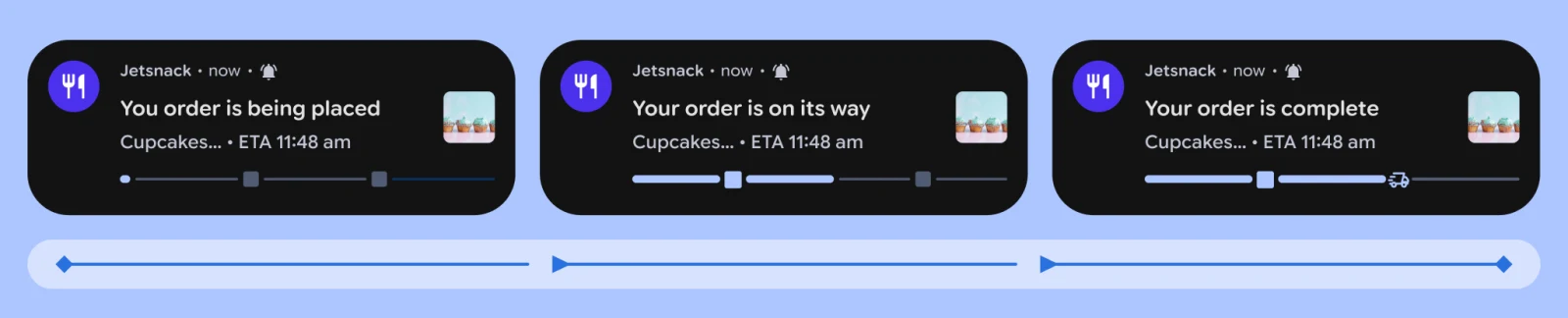

It does not promise arbitrary HTML, a Compose screen, or a SwiftUI-like canvas in the status bar. The system template limits styling but lets the OS adapt the information to its own interface. Requesting promotion is not the same as receiving it, and promotion does not prove that someone looked at the notification.
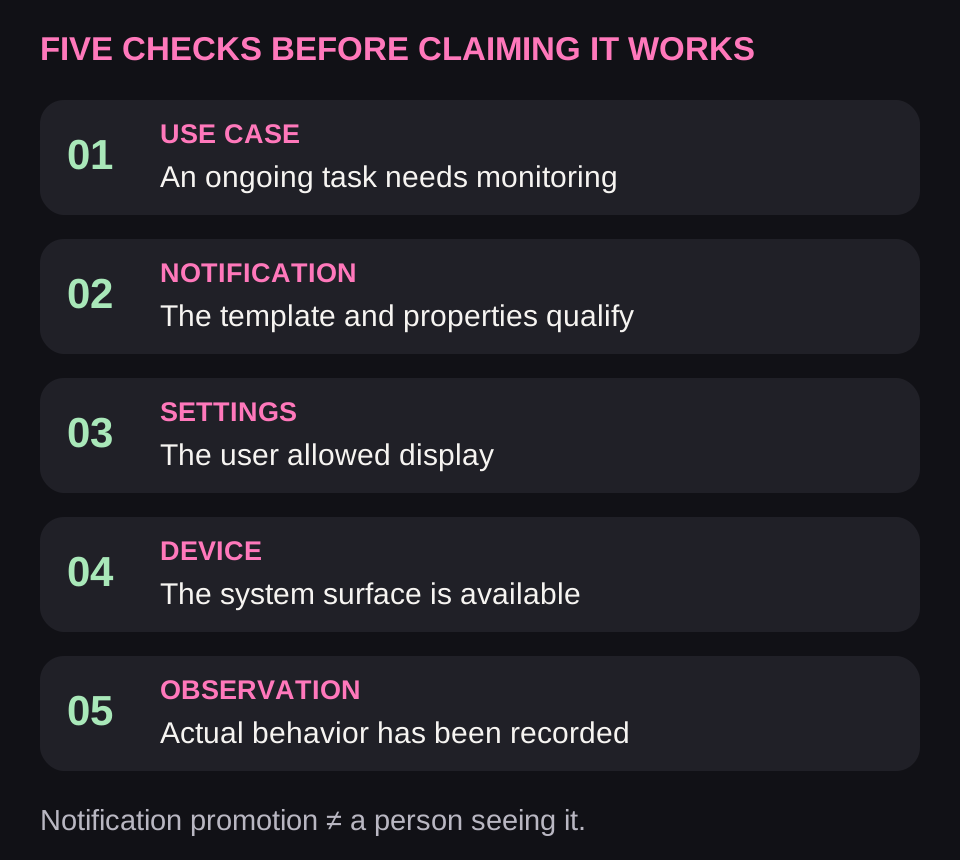
For the team, these are five independent questions: is the task suitable; is the notification configured correctly; is display allowed; does the device support it; and what was actually observed in testing? None can be replaced with “Android 16+” in a specification.
2. Which tasks fit, and which need another mechanism
| Scenario | Start with | Why |
|---|---|---|
| Active trip / food delivery | A Live Update when eligibility criteria are met | People need to check the current state repeatedly |
| File download / ordinary processing | Progress notification | Duration alone does not justify promotion |
| A parcel in transit for several days | A status screen and meaningful notifications | No continuous need to watch |
| Music / podcast | MediaSession / Media3 | The system already provides suitable controls |
| A frequent short command | Widget, shortcut, Quick Settings | No need to simulate an endless activity |
| Messaging | Conversation notifications / RemoteInput | A message and an ongoing trip have different lifecycles |
A useful criterion is the need to check the state repeatedly right now. Food delivery and an active trip have a clear ending and a changing answer. A parcel taking a week to arrive usually does not need a permanent card for the whole week. An arrival notification remains useful.
Video processing or AI generation does not qualify for Live Updates merely because it takes time. Start with a regular task state and a result notification. If someone deliberately follows a short ongoing process, evaluate the scenario against the chosen API's rules. Do not present an invented smooth animation as measured progress.
For frequent access to a feature, consider a widget or Quick Settings tile. For music, use a system media session. For communication, use conversation notifications and eligible bubbles. These mechanisms solve their own problems without artificially turning everything into a live activity.
3. OS version, AndroidX, and manufacturer skin are separate dependencies
| Layer | What to check | What it does not imply |
|---|---|---|
| Project SDK | Available classes, compileSdk, and AndroidX | That the feature exists on the phone |
| Android 16 / API 36 | ProgressStyle | A guaranteed capsule in every skin |
| Promoted Live Update | Build, API availability, and settings | Guaranteed viewing by the user |
| Android 17 / API 37 | MetricStyle for measured values | That all three metrics are visible when collapsed |
| OEM firmware | Model, market, approval, and scenario | That another model from the same brand behaves identically |
ProgressStyle arrived in Android 16. Style availability, system promotion, and a manufacturer's island are different capabilities. Check the runtime, QPR/build, and manufacturer firmware, not just compileSdk.
In AndroidX, the setRequestPromotedOngoing and setShortCriticalText methods are documented from Core 1.17.0. This is not a recommendation to upgrade project dependencies blindly: first inspect the installed version, its requirements, and compatibility. Compat does not add a new physical surface to an old OS.
4. Permissions and the notification channel
The manifest needs regular notification access and a separate declaration for promotion:
<uses-permission android:name="android.permission.POST_NOTIFICATIONS" />
<uses-permission android:name="android.permission.POST_PROMOTED_NOTIFICATIONS" />
On Android 13+, most notifications require the POST_NOTIFICATIONS runtime permission. Ask in a meaningful context, such as when someone enables order tracking. The notification permission rules describe denial and changes during system upgrades. POST_PROMOTED_NOTIFICATIONS does not replace this check and is not a second ordinary runtime dialog.
Create a channel on Android 8+. Choose importance according to the event's meaning. You cannot programmatically raise it above the user's choice; an existing channel retains user settings. A promoted notification's channel must not use IMPORTANCE_MIN.
if (Build.VERSION.SDK_INT >= Build.VERSION_CODES.O) {
    val channel = NotificationChannel(
        "active_orders",
        "Active orders",
        NotificationManager.IMPORTANCE_LOW
    )
    context.getSystemService(NotificationManager::class.java)
        .createNotificationChannel(channel)
}
The example hardcodes text for brevity; localize it in the app. Creating a channel does not enable disabled notifications. Check app and channel settings and keep the order screen usable if notifications are unavailable. Do not silently switch to SMS, email, or an overlay.
5. A minimal Kotlin example and precise navigation to the order
Below is one notification built with an AndroidX Core version containing the required methods. snapshot is an already validated order state from the app, openOrderPendingIntent opens a specific order, and the icon is a project resource. Implement these objects within the existing architecture.
val builder = NotificationCompat.Builder(context, "active_orders")
    .setSmallIcon(R.drawable.ic_delivery_status)
    .setContentTitle("Order on the way")
    .setContentText(snapshot.summary)
    .setShortCriticalText(
        snapshot.etaMinutes?.let { "$it min" }
    )
    .setOngoing(true)
    .setRequestPromotedOngoing(true)
    .setOnlyAlertOnce(true)
    .setVisibility(NotificationCompat.VISIBILITY_PRIVATE)
    .setContentIntent(openOrderPendingIntent)

val notification = builder.build()
The snippet deliberately avoids inventing “4 minutes” when the ETA is absent. Compact text needs a very short answer; the system decides the displayed length. setOnlyAlertOnce(true) helps avoid alerting again for every change, but an important transition such as “driver waiting” needs its own deliberate behavior.
Before posting, check the runtime permission and whether notifications are enabled. Then update the same task instance using one stable identifier:
NotificationManagerCompat.from(context)
    .notify(snapshot.notificationId, notification)
notify is called here only after those checks. Different orders need different IDs or tag + ID pairs. If every process uses one ID, the new trip overwrites the previous one. Under the notification update mechanism, posting again with the same identifier changes the existing notification.
For PendingIntent, use an explicit destination, appropriate flags, and the identity of the specific object. Different extras alone do not always produce different PendingIntents. On navigation, recheck the current account and permission to view the order; a link does not authenticate the user. Do not send them to the home screen to search for the right trip.
6. ProgressStyle: stages and checkpoints
ProgressStyle describes movement through a process: segments define portions, points define checkpoints, and the value defines a position on the same scale. It suits a route with stops or a delivery with stages. Do not accidentally treat segment length as seconds in one place and percentages in another.
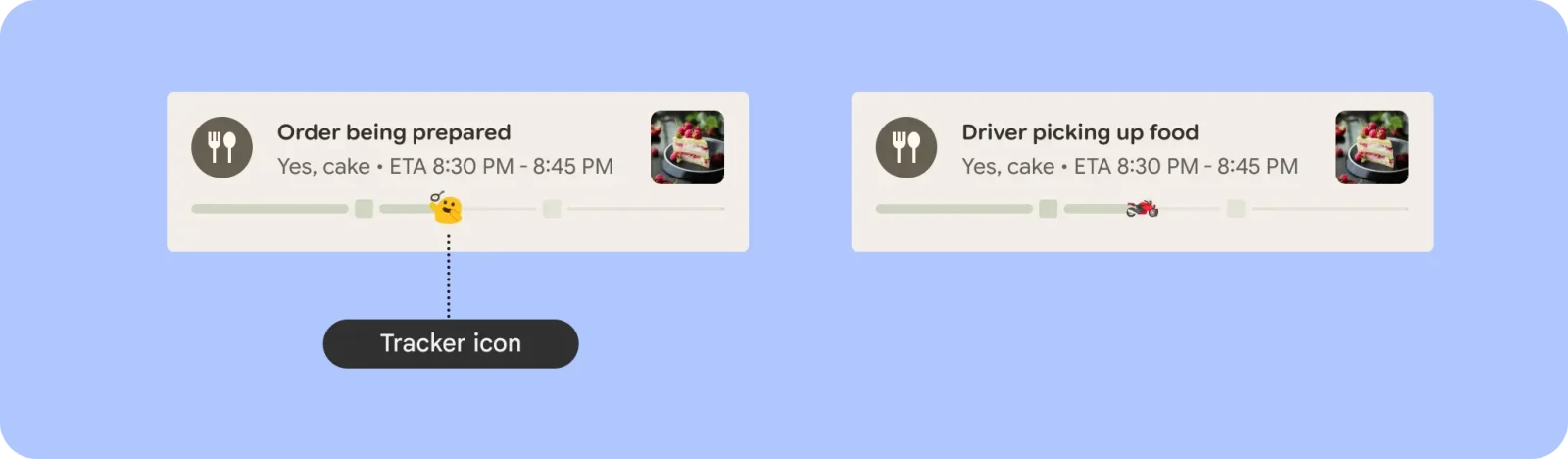
The AndroidX version uses NotificationCompat.ProgressStyle. Pair it with the Compat Builder; pair the platform Notification.ProgressStyle with the corresponding platform API. Do not mix the two types from similar-looking examples.
val progressStyle = NotificationCompat.ProgressStyle()
    .setProgressSegments(listOf(
        NotificationCompat.ProgressStyle.Segment(20),
        NotificationCompat.ProgressStyle.Segment(30),
        NotificationCompat.ProgressStyle.Segment(50)
    ))
    .setProgress(measuredProgress)

// Apply before builder.build():
builder.setStyle(progressStyle)
In this educational example, the three lengths create a scale of 100. measuredProgress must come from the real model and stay within its range; 20/30/50 only illustrates the API structure. If stages are known but completion percentage is not, name the stage in words. An arbitrary “65%” does not make the estimate more accurate.
7. MetricStyle, timers, and measured values
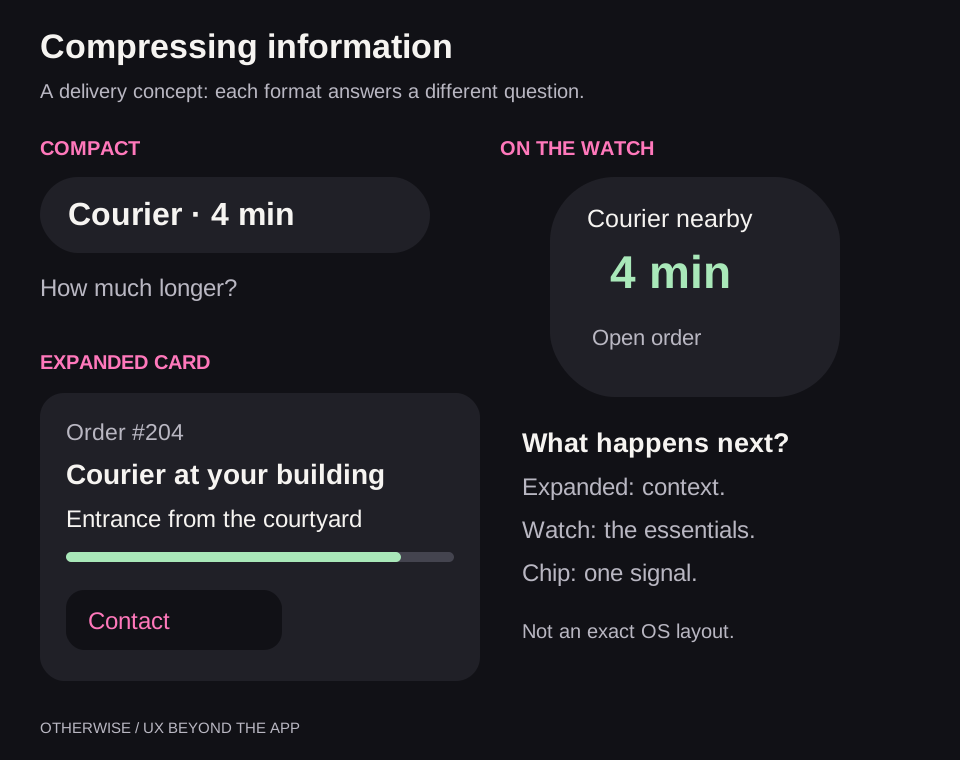
MetricStyle in Android 17 is designed for measured quantities and supports up to three metrics and three actions. In the expanded view, the label, value, and unit matter; some metrics may not fit when collapsed. Put the most important one first.
For a workout, these might be time, distance, and heart rate; a timer needs only one time value. Three available slots do not oblige you to fill them. If heart rate stops updating, the old value must not keep looking like a live measurement.
A system chronometer or countdown is preferable to a new network message every second. For regular supported notifications, look at setUsesChronometer(), setWhen() and countdown mode; for MetricStyle, check its current time facilities. A courier ETA differs from a timer: it is a forecast that needs fresh data.
8. How to tell whether promotion is actually available
| Check | What it confirms | What it does not confirm |
|---|---|---|
| hasPromotableCharacteristics() | Notification properties are eligible for promotion | The user allowed Live Updates |
| canPostPromotedNotifications() | The app is allowed promotion under the current settings | The specific notification meets the requirements |
| FLAG_PROMOTED_ONGOING | The observed notification has the promotion flag | Someone saw or read the card |
| Template and property checks | Ongoing, title, eligible style; no custom RemoteViews, group summary, or colorized=true; channel is not MIN | The manufacturer permits the scenario |
Run checks only on versions where the relevant symbols are available. To open settings, use Settings.ACTION_MANAGE_APP_PROMOTED_NOTIFICATIONS; explain the benefit first and check that the intent is supported. Do not reopen settings after every refusal.
Failed promotion does not itself mean that the order stopped or data was lost. It is a presentation state. The main user journey must remain understandable without a capsule. In analytics, distinguish notification creation, allowed promotion, an observed system flag, and a human action.
9. Background updates, freshness, and ending
The Notification API does not keep the app running. Server transport, background execution, and notification display are separate mechanisms. FCM or OEM push must deliver the event, code must process it in an allowed context, and the adapter must reflect the current state. A successful server send does not prove the card has already updated.
A foreground service is appropriate only for relevant user work and an allowed service type. Do not add one solely to keep an island visible. Google separately describes restrictions on starting foreground services from the background. WorkManager is not a second-by-second real-time channel either.
Store task identity, state revision, confirmation time, and the ending condition. An old “courier departed” message arriving after “delivered” must not resurrect the activity. Switching accounts requires clearing views associated with the previous account.
Decide in advance what missing data means. You can show the last known stage with a timestamp, remove an unreliable ETA, or end the live view according to product rules. This must be an explicit design decision; never silently replace an unknown value with zero or indefinitely extend a promise of “one minute.”
Stop ongoing updates on completion. If a summary is needed, post the designed final state; otherwise remove the notification with cancel. Dismissal by the user does not cancel the order. Dismissal behavior for ongoing notifications varies by version — test it instead of forcing the card back to demand attention.
10. Samsung, Xiaomi, OPPO, and others: separate integration conditions
In this table, “public API” means a documented development mechanism. “OEM path” means a separate manufacturer channel that may require approval. “Device feature” confirms a user capability, not an SDK available to every app. These are different levels of evidence.
| Ecosystem | Name and surface | Developer path | What to check |
|---|---|---|---|
| Google Pixel and compatible Android | Live Updates, card, status chip | Public Android API | System version, permissions, promotion |
| Samsung Galaxy | Now Bar, Live notifications | System APIs by activity type; verify actual Now Bar support separately | Model, firmware, app list, and Lock Screen settings |
| Xiaomi / Redmi / POCO | HyperIsland / Super Island | Documented OEM path, application, and scenario review | Market, firmware, template, app approval |
| OPPO | Fluid Cloud / Live Alerts | OEM integration; test the standard Android path on the device | Approval and channel availability |
| OnePlus | Fluid Cloud | Start with standard mechanisms; do not promise an arbitrary branded card | OxygenOS, region, app, and scenario |
| realme | Mini Capsule; Live Alerts in the relevant skins | Selected device features; general Mini Capsule access is unconfirmed | The specific model, not the entire brand |
| vivo / iQOO | Atomic Notifications / Origin Island | OEM path requiring approval, local and server updates | OriginOS, templates, channel, and limits |
| HONOR | Magic Capsule, Magic Live / YOYO | Scenario-based integration into the manufacturer's system | Program access and agreed surfaces |
| Huawei | Live View / Live Capsule | Distinguish EMUI from native HarmonyOS with Live View Kit | The app platform and specific Kit version |
| Nothing | Glyph Interface / Glyph Matrix | Official developer kits | Model, matrix type, lifecycle, SDK terms |
| TECNO / Infinix | Dynamic Port / Magic Ring | Device features; a universal public SDK is not confirmed here | Do not make the branded capsule a mandatory channel |
| Motorola, Sony, ASUS, HMD, TCL, ZTE, and others | Common Android surfaces and model-specific features | Documented Android APIs | Availability of the specific capability; this row does not imply an absence of OEM features |
Samsung: test Now Bar as a separate presentation
Samsung primarily describes Now Bar as a Lock Screen surface for supported activities. People choose apps in settings; notifications and Lock Screen display must also be enabled. “The system is new, so our app will definitely appear” is therefore a weak technical assumption. Samsung's Now Bar setup instructions list the required switches and explain how to diagnose missing content.
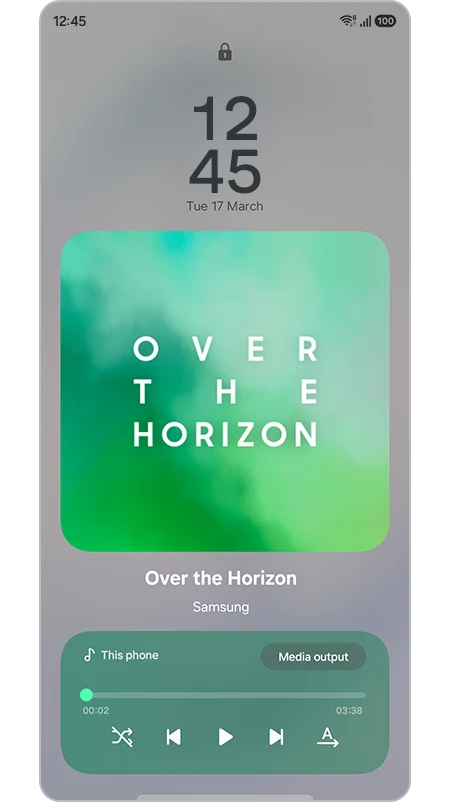
For a media product, start by correctly implementing system playback. For delivery, test standard Live Updates. Do not promise direct control of arbitrary Now Bar content until you find a suitable documented path for your specific app.
Xiaomi: an expressive interface and a separate onboarding process
Xiaomi offers Super Island with multiple islands, expansion, opening a small window, and transferring content by dragging. The official process includes app registration, a service request, scenario approval, and testing. Its documentation also describes MiPush for delivering messages when the app process is not running.
Xiaomi's criteria are not identical to Google's. The Super Island eligibility rules specify a finite lifecycle of up to 12 hours and prohibit marketing scenarios; some categories are handled by the system and are not open to duplicate integrations. Do not automatically apply the Chinese portal's terms to Global/EEA: confirm program access and international firmware behavior separately.
OPPO, OnePlus, and realme: similar names do not mean a shared contract
OPPO has its own Fluid Cloud integration path. For example, the Alibaba Cloud EMAS guide to updating Fluid Cloud describes preparation, approval with OPPO, and server operations. This establishes the capabilities of that integration channel, not universal access for every APK in every region.
OnePlus showcases Fluid Cloud in OxygenOS 16 for music, sports, traffic information, and delivery. But a product presentation does not replace an integration specification. On the realme C75, Mini Capsule 3.0 demonstrates Grab status; support for that service does not prove that every third-party app can integrate in the same way. Even closely related ecosystems need separate compatibility matrices.
vivo and HONOR: design a scenario, not an arbitrary banner
vivo's atomic notifications support creating, changing, and ending an activity. The Origin Island integration description through EMAS shows templates for capsules, cards, and the Lock Screen, local operations, and server push; access must be requested. The page marks this channel's feature as being in public testing. Record frequency and duration limits from the current contract for the specific channel, not a generic Android table.
HONOR treats Magic Capsule as one entry point into Magic Live and YOYO, alongside recommendations, AOD, and other views. This is useful for services with a clear current intent: trips, bookings, and order collection. However, a capsule's presence in the system does not entitle an app to occupy it continuously; confirm the exact integration path and access conditions through the manufacturer's program.
Huawei: the device name does not determine the development stack
Huawei's user-facing Live View includes a compact capsule and an expandable card for the current task. HarmonyOS NEXT has a separate Live View Kit. Do not treat it as another Android library: native HarmonyOS requires its own implementation. Nor can the terms of a specific Kit version be applied to the entire Huawei device fleet.
Nothing: the enclosure becomes an interface
For Glyph Interface has a published developer kit, but its documentation limits use to foreground apps. That matters: an impressive LED demonstration alone does not justify promising a background delivery indicator.
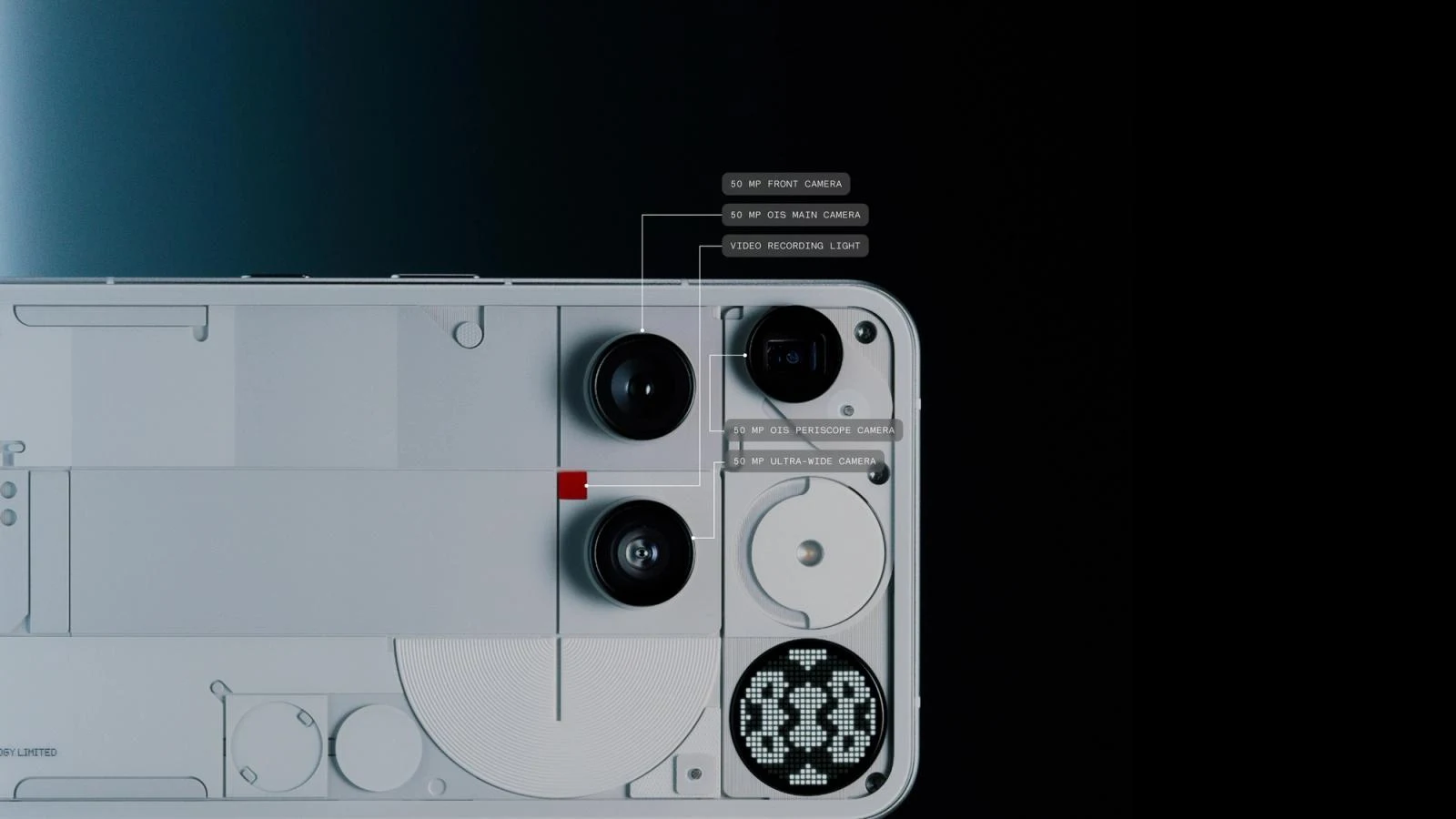
Glyph Matrix has its own interfaces and Glyph Toys. The support table distinguishes Phone (3) and Phone (4a) Pro by matrix size and interaction capabilities. Check hardware capabilities at runtime, display priorities, and SDK terms. A public repository does not replace that verification.
A good project example is a clear indicator of remaining time in a focus session. A poor one is a dozen similar blinking patterns whose meanings people must memorize. Light must not be the only confirmation of an error or completion.
TECNO, Infinix, and the long tail of devices
Manufacturers demonstrate Dynamic Port in HiOS and Magic Ring on Infinix. This research did not confirm a universal public path for creating custom capsules with these mechanisms. That is not a claim that integration is impossible; it is a reason not to sell it as an already secured project feature.
LED panels and rear displays need their own classification. The secondary-display guide covers Glyph Matrix, a regular app on Ulefone, Presentation, and WindowManager. HyperIsland approval does not grant permission to draw on Xiaomi's rear panel.
11. Architecture: one task, several adapters
The app should have one current order model. The regular screen, notification, and permitted OEM views are derived from it. The manufacturer affects output format and delivery channel, but must not create an independent version of the truth about where the courier is.
For an OEM adapter, record the market and build, app identifier, approved scenario, payload schema, allowed actions, transport, update rules, and ending rules. Take Notification.extras values from the official specification, not a guess based on the capsule's appearance. Adding a library without approval and a validated payload does not yet constitute an integration.
Commands are shared too: tapping a notification invokes the same validated domain handler as the screen. A repeated request must not cancel an order twice or toggle a workout back. Provide the necessary confirmation for an irreversible action; a system button's size does not reduce the risk of a mistaken tap.
12. Privacy and accessibility
Design a public version of the Lock Screen content. VISIBILITY_PUBLIC, PRIVATE, SECRET and an appropriate public version help control disclosure, but the result also depends on user and system settings. Details are in the Android notification guide.
An order number, driver name, address, pickup code, and medical measurements differ in sensitivity. Do not copy everything from the main screen into a small card. Access to a command must not bypass authorization; a private label does not protect the action itself.
Test TalkBack, large text, RTL, long translations, contrast, the Lock Screen, and AOD. The color of a progress segment should supplement clear text. A short number without a unit can become meaningless when the OS removes secondary labels.
13. Pre-release test matrix
| Condition | Expected check |
|---|---|
| Pixel / standard implementation | Base style, settings, and observed promotion |
| Samsung, Xiaomi, and selected OEMs | Manufacturer surface, model/region, approval, and template |
| Notifications or promotion disabled | Honest unavailability; the main order remains accessible |
| Lock Screen / AOD / large text | No unnecessary disclosure; the main answer is clear |
| No network / old and duplicate events | Do not present an old ETA as current; completion is not reversed |
| Backgrounded / process removed / force-stop | Test each mode separately |
| Multiple tasks and accounts | Correct IDs, actions, navigation, and cleanup |
| The user dismissed the notification | No intrusive restoration to demand attention |
| Completion / cancellation | Updates stopped, final display designed |
| Older target Android version | Its independent base scenario has been tested |
For every result, record the device, OS version/build, firmware region, app version, and settings. “Tested on Android” is too vague. An emulator helps with the general implementation, but does not prove Now Bar or HyperIsland behavior on a real phone.
An acceptance criterion can be stated as follows: the user receives a trustworthy current state, opens the correct task, sees when data becomes stale, retains control over the notification, and does not receive a stale activity again after completion. A beautiful chip without these properties is still only a demonstration.
Apply this guide with Codex and Claude Code
This research led us to create open skills for Codex and Claude Code: Interaction Surfaces and Adaptive Interfaces. They analyze an existing website or app, identify available APIs, and suggest useful improvements such as widgets, ongoing activities, watch experiences, secondary displays, and adaptive layouts. You choose which scenarios to implement, defer, or leave out; the agent then implements the selected changes and verifies them within the available platforms and devices.
To work on your own app, you can install the Interaction Surfaces skill from GitHub. It includes a Kotlin example, Live Updates permissions and diagnostics, OEM integrations, and a separate Wear OS guide. The English package covers the whole series; the installation instructions and example invocation are in the overview.
Frequently asked questions
Can you build one universal island for all Android devices?
You can use a shared data model and standard APIs, but cannot guarantee the same skin, position, actions, and approval on every device. OEM paths require separate integrations.
Why is there no capsule when the notification was created?
Check scenario eligibility, notification properties, the channel, promotion settings, runtime, and manufacturer conditions. Calling notify alone does not promise a promoted view.
Do I need SYSTEM_ALERT_WINDOW?
Not for a system Live Update. A custom overlay is a different window type with a special permission and restrictions. It does not replace native status-bar integration.
Does a standard notification work on older devices?
It is a separate supported path that you must design and test for target versions. Do not promise new system views solely on the basis of the Compat library.