
Google Analytics routinely misses 25 to 40 percent of real visitors to ad blockers, privacy browsers, and EU consent rejection, then delays and models the rest. Umami 3.x now adds heatmaps, session replays, boards, funnels, and Web Vitals, while Matomo remains the heavier full-suite option.
The number in your Google Analytics dashboard is not your traffic. When site owners compare GA against their raw server logs, GA consistently reports 25 to 40 percent fewer visitors than the server actually served, and on technical or privacy-conscious audiences the gap climbs past half. This is not a tracking misconfiguration that a specialist can tune away. It is the structural result of how GA collects data in 2026.
Three forces drive the loss, and they compound. Ad blockers and privacy browsers refuse the tracking script outright, cookie-consent law in the EU removes another slice, and GA fills the holes with machine-modeled estimates rather than real counts. So the honest question is not how to repair Google Analytics. It is whether a tool that cannot see a third of your audience, and quietly guesses the rest, should be the source of truth a business makes decisions on.
Why Google Analytics cannot see a large share of your visitors
GA loads its tracker from google-analytics.com, a third-party domain that sits on every ad blocker filter list. Roughly 30 percent of internet users now run an ad blocker, and major browsers block analytics by default with no extension required: Safari through Intelligent Tracking Prevention, Brave out of the box, and Firefox through Enhanced Tracking Protection. Each of those visits simply never reaches your reports.
In the EU the loss is worse, because consent stacks on top of blocking. GA sets cookies classified as non-essential, so a site must obtain opt-in before the script may load, and every visitor who rejects the banner disappears or is replaced by a modeled estimate. An Orbit Media study found that when consent banners are shown, GA4 failed to capture an average of 55.6 percent of real traffic compared with a privacy-friendly tool. That is not a rounding error. It is half the audience on a normal site, decided before anyone looks at a single report.
The business consequences are concrete. A blog post with 10,000 real readers might show 6,500, so you underrate your best content. Conversion rates look worse than they are, ad spend appears less effective than it is, and budget gets moved away from channels that were actually working. Decisions made on undercounted data are wrong in predictable, expensive ways.
The data you do get arrives late and partly hidden
Even for the visitors GA does capture, the reporting is slow and incomplete. Google states that standard GA4 reports carry a processing latency of 24 to 48 hours, and attribution or modeled figures can keep shifting for up to 72 hours, which is why analysts are told to ignore the last two days. For a client who launched a campaign this morning and wants to know if it worked, that is not an answer.
Two more mechanisms quietly remove data. GA4 applies sampling on high-traffic properties and complex reports, analyzing a subset and extrapolating, which is most aggressive on free accounts. It also applies thresholding, where Google hides any segment whose user count falls below a privacy threshold, so low-volume but important views can appear empty even though data exists. The real-time report that remains is limited to the last 30 minutes, excludes revenue, and is explicitly not built for analysis.
Layered on top is the event-based data model that replaced Universal Analytics. It is more powerful in theory and considerably harder to read in practice, which is why GA numbers so often fail to match what a client sees in Shopify or their ad platform. For most business owners, the result is a tool they cannot interpret reporting numbers they cannot fully trust.
The compliance burden nobody asked the client to carry
Google Analytics transfers personal data from the EU to servers in the United States, which has been the core of its legal trouble. After the Court of Justice struck down the Privacy Shield in the Schrems II ruling, data protection authorities in Austria, France, Italy, Denmark and others ruled that using Google Analytics on EU visitors was unlawful. The EU-US Data Privacy Framework adopted in 2023 made those transfers conditionally legal again, but privacy regulators and the activist group noyb have signaled they will challenge it, so the legal ground remains unsettled.
Separately from the transfer question, the ePrivacy rules still require opt-in consent before GA's cookies load, which is exactly what produces the consent banner and the data loss described above. The practical effect is that an EU business using GA inherits a compliance obligation, a worse user experience, and a measurement gap all at once. Self-hosted analytics removes the chain at its root, because the data never leaves your infrastructure and, run cookielessly, it needs no banner.
What self-hosting actually changes
A self-hosted analytics tool serves its tracking script from your own domain and stores the data on your own server. That single architectural change fixes those problems at once. The script is a first-party request, so ad blockers that key on third-party tracker domains do not recognize it, and far more visitors are counted. Run without cookies, it needs no consent banner, so the EU traffic GA loses is captured in full. And because nothing is sent to a third party, there is no transfer to litigate and no modeled guesswork, just real numbers in real time with no sampling and no thresholding.
Umami can go further than simply avoiding Google's blocked domain. Its ad-blocker bypass
guidance describes three practical layers: proxy the tracker through your own web server, host the
tracker script on your own domain, and, on self-hosted installs, rename both the tracker script and the
collection endpoint. In practice that means the browser does not request cloud.umami.is/script.js
or post to the obvious /api/send path; it loads something like /stats.js from the
client's own domain and sends events to a custom first-party endpoint. That does not make analytics unblockable,
but it removes the easy blocklist matches that make GA disappear before the page has even finished loading.
There is a lighter performance cost too. A self-hosted tracker like Umami is around 2 KB, a fraction of Google's tag, so it adds less main-thread work and helps rather than hurts the Core Web Vitals that feed search rankings. The honest tradeoff is that someone has to host and maintain the tool, keep the proxy or custom endpoint healthy, and update a locally hosted tracker when Umami changes. First-party tracking is still a moving target as blocklists evolve, though it remains far less exposed than GA. For most businesses the cleanest path is to let an agency run it, which is part of what our analytics and reporting service exists to do.
Umami or Matomo: which one, and when
The two self-hosted tools we deploy most still solve different problems: Umami for a clean, lightweight analytics layer and Matomo for a broader enterprise-style analytics suite. But Umami has changed materially in 2026. It is no longer just the lean pageview dashboard. The current Umami 3.x line adds custom boards, sessions, funnels, goals, retention, revenue reporting, Core Web Vitals, session replays, and heatmaps while keeping the base tracker small and cookieless. Matomo remains the heavier full-suite analytics platform, especially when a client needs a mature e-commerce analytics layer, built-in tag management, GDPR administration, consent-free configuration, or a long plugin ecosystem. But the old rule that Umami is only for simple traffic and Matomo is required for behavior analysis is now outdated.
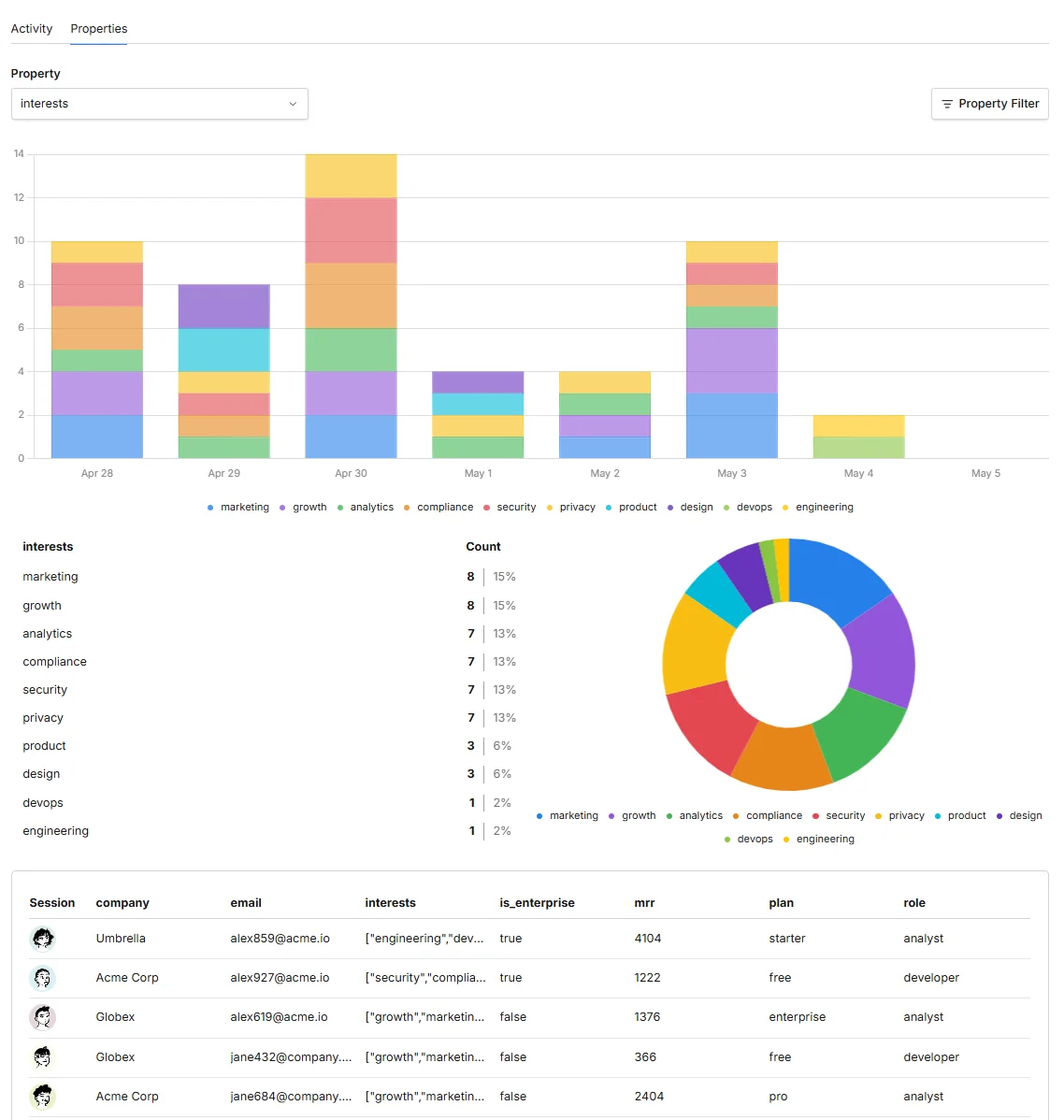
The important caveat is consent. Umami's normal traffic tracking stays cookieless, but replays, heatmaps, and performance monitoring use extra browser-side collection. For EU projects we treat those as opt-in features and enable them only when the consent flow, masking level, and sensitive-element blocking are designed deliberately. The point is not to turn a privacy tool into surveillance; it is to use deeper diagnostics only where the business has a legitimate need and the visitor experience stays clean.
| Criteria | Umami | Matomo | Google Analytics 4 |
|---|---|---|---|
| Tracker script | ~2 KB | ~23 KB | Heavier tag |
| Cookies and consent banner | Cookieless, no banner | Consent-free possible with privacy config | Sets cookies, consent required in EU |
| Data ownership | Yours, on your server | Yours, self-hosted | Google's US servers |
| Real-time and freshness | Instant | Instant | 30-min view, reports delayed 24 to 48h |
| Sampling and thresholding | None | None | Yes, on high traffic and small segments |
| Heatmaps and session recording | Yes: replays in v3.1, heatmaps in v3.2 | Yes (paid plugins) | None |
| Tag management | Use external tags or direct events | Built-in tag manager | Best with Google Tag Manager |
| Funnels and e-commerce | Funnels, goals, revenue reports | Full, mature e-commerce suite | Full |
| Performance monitoring | Core Web Vitals in v3.1 | Available through broader reporting setup | Not a primary GA4 report |
| Server resources | ~1 GB RAM | 2 to 4 GB RAM | None, hosted by Google |
| Google Ads integration | No | No | Native and deep |
| Dashboard | Cleanest, client-friendly | Powerful, denser | Complex, analyst-oriented |
One assumption is worth correcting, because it is often used to defend GA: that it offers visual tools like heatmaps. GA4 has no native heatmaps at all. Umami now provides both session replay and heatmaps in the 3.x line, and Matomo provides them through its behavior analytics plugins. The feature some people stay with GA for is one it never actually had.
The view the client actually wants to read
Most business owners do not need attribution modeling or two hundred dimensions. They need to see who visited, when, from where, and what they did, and to trust that the numbers are real. A self-hosted dashboard answers that in a few clicks and in real time, which is the opposite of the interpretation-heavy reports GA produces. It also lets you exclude your own and the client's visits, so internal browsing and the owner checking their own site never pollute the statistics.
Source tracking matters more than ever, because buyers increasingly arrive from AI search rather than a classic Google result. A clean analytics setup shows referrals from chatgpt.com, perplexity.ai, and Gemini distinctly, so a client can see exactly how much of their audience now comes from AI assistants, which is the same trend our AI search optimization work is built around. On top of that, a flexible event system can be configured to watch the specific actions that matter, such as sign-ups, key clicks, or checkout steps, and those signals feed directly into improving the site rather than sitting in a report nobody opens.
Where Google Analytics still earns a place
This is not a case for pretending GA has no value. GA4 is free, and its real strength is the Google advertising ecosystem. If you run meaningful Google Ads, GA4's conversion tracking, remarketing audiences, and bidding signals are tightly integrated in a way no privacy tool replicates, and it links cleanly to Search Console and BigQuery. For an advertiser, that loop is genuinely useful.
The pragmatic answer for many businesses is therefore not one tool but two. Keep GA4 where it does real work, closing the loop on paid campaigns, and run a self-hosted tool as the source of truth for what actually happens on the site. That way the ad platform gets its signals while the business gets accurate, private, readable numbers it owns.
How to decide
The right setup follows from a few honest questions rather than habit.
- Do you run heavy Google Ads: if yes, keep GA4 for the ad loop and add a self-hosted tool for truth; if no, GA4's main advantage does not apply to you.
- Is your audience technical, privacy-minded, or EU-based: the more it is, the more traffic GA loses, and the stronger the case for cookieless self-hosting.
- Will the client read it themselves: if clarity matters, Umami's dashboard wins on readability.
- Do you need heatmaps or session replays: Umami now covers this directly, but turn those features on deliberately with consent and masking rules. Choose Matomo when the requirement is deeper e-commerce analysis or a plugin-heavy analytics suite.
- Do you need tag governance: Matomo's built-in tag manager is useful when marketing tags, consent rules, and analytics events must be managed in one place. Umami works better when the tracking plan is intentionally small and events are wired directly.
- Who maintains it: decide whether your team will host and update the tool or hand that to an agency.
Google Analytics gives you an incomplete count, delivered late, partly modeled, and wrapped in a compliance obligation, which is a weak foundation for real decisions. Self-hosted analytics fixes the accuracy, the privacy, and the readability at the same time: Umami for clean, client-friendly clarity with optional heatmaps, replays, boards, and Web Vitals; Matomo for heavier e-commerce and plugin-driven analytics; and GA4 kept only where the advertising ecosystem genuinely calls for it. The point is to base decisions on numbers that are real and that you own, which is the standard we hold every client's reporting to.
Is Google Analytics actually inaccurate?
It undercounts. Server-log comparisons routinely show GA missing 25 to 40 percent of real visitors, and more than half on technical or EU audiences, because of ad blockers, privacy browsers, and consent rejection.
Is Google Analytics legal in the EU in 2026?
Conditionally. The 2023 Data Privacy Framework made data transfers legal again, but the framework is contested and you still need opt-in cookie consent before GA loads, which itself causes data loss.
Do Umami and Matomo need a cookie consent banner?
For basic pageview analytics, Umami is cookieless by default and needs no banner. Matomo can run cookieless with a short configuration, and France's CNIL has published a guide for exactly that exemption. Replays, heatmaps, and browser performance collection are different: treat them as opt-in features on EU-facing sites.
Does Google Analytics have heatmaps?
No. GA4 has no native heatmaps. If you want heatmaps or session recordings, current Umami provides them directly in the 3.x line and Matomo provides them through behavior analytics plugins.
Can self-hosted analytics show traffic from ChatGPT or Gemini?
Yes. With clean referrer tracking you can see visits from chatgpt.com, perplexity.ai, and Gemini distinctly, which helps you measure how much audience now arrives from AI assistants.
Is self-hosted analytics hard to maintain?
Umami runs comfortably on a small server for normal analytics, while Matomo needs more resources. Replays and heatmaps add storage and privacy configuration, so the main requirement is someone to host, update, and govern the setup properly.
Can I keep Google Analytics and add a self-hosted tool?
Yes, and many businesses do. GA4 handles the Google Ads loop while a self-hosted tool serves as the accurate, private source of truth for site behavior.