

We will follow two journeys: signing in with a one-time code and receiving a booking confirmation. The first needs a clear message and a usable input field. The second adds a logo, PDF ticket, Gmail metadata and a calendar file. Each example separates your server’s job from the mail client’s behavior and shows how to check the result.
Start with the job you need: a code email, a confirmation with attachments, Gmail reservation metadata, a promotion, or a calendar event. The later sections cover web inputs and WebOTP, Android and iPhone. These are separate integrations; implementing one does not enable the others.
Updated November 12, 2026. Added a complete email example, local .eml generation, Gmail field explanations and the calendar invitation lifecycle.
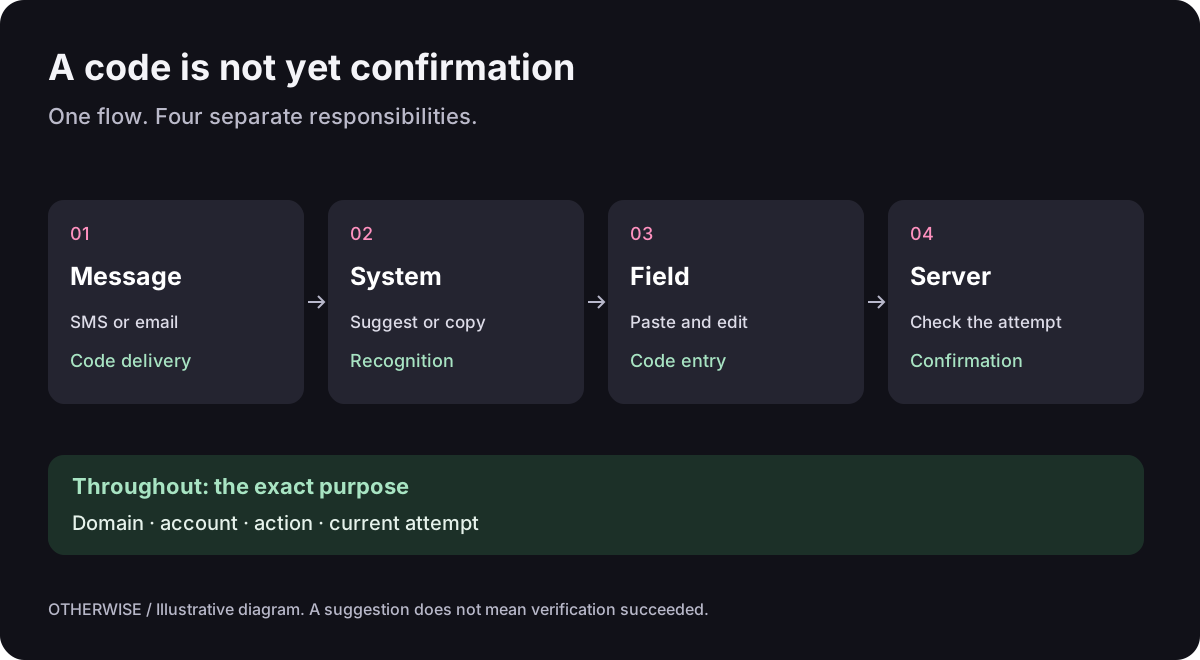
Copying, autofill, and verification are three different tasks
Recognition finds the code in a message. Autofill suggests it or transfers it to the right field. Server verification determines whether the code confirms a specific action. A convenient button replaces neither the link to a sign-in attempt nor the expiry check.
An OTP is a one-time code, not necessarily a “second factor.” Codes for address verification, passwordless sign-in, and an additional check after entering a password may look identical. The interface must explain the purpose of the action, and the architecture must distinguish these scenarios.
What changed in Gmail — and what it does not promise
In September 2026, specialist publications reported an OTP copy button in mobile Gmail. Android Authority describes a button directly below the email subject in the inbox. The observations cover Android and iOS. This is a report of a feature rollout, not a published developer contract.
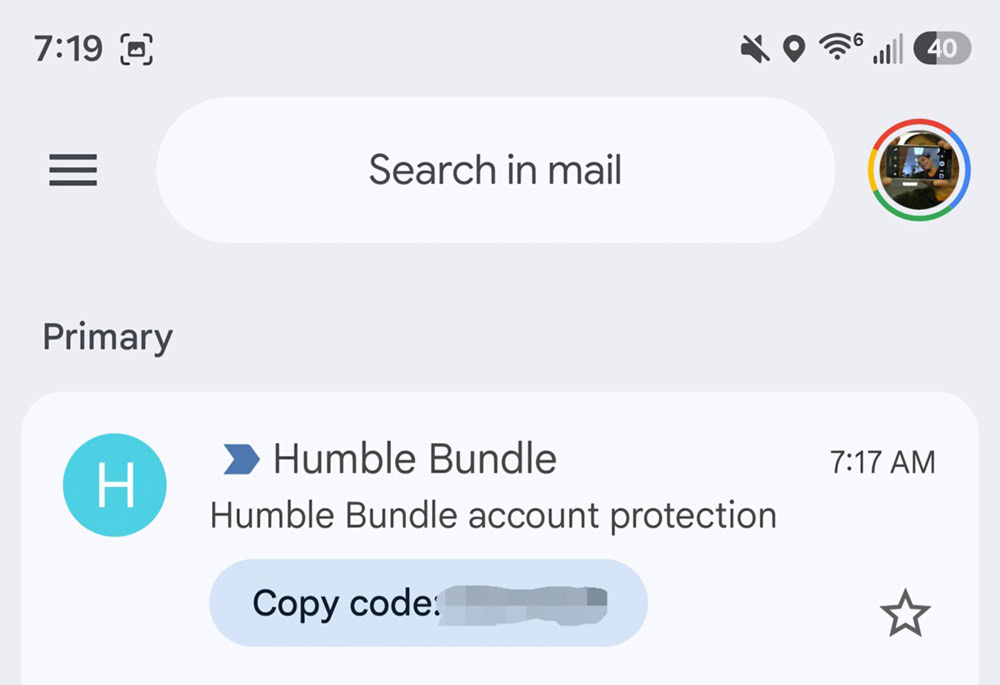
A product specification therefore cannot promise that “everyone will see Copy code in Gmail.” Recognition depends on the email and feature availability. Do not extend an observation about the message list to push notifications, Gmail on the web, or any other email client. For your own service, make the email understandable without a special button.
A suggested email template: the subject “Your Example sign-in code,” one clearly visible code, the purpose of the action, the expiry period, and instructions for anyone who did not request the sign-in. Avoid similar six-digit order numbers nearby, unnecessary promotional blocks, or a code available only as an image. Include a plain-text part in the MIME message. Check the actual result in the clients people use. These are clarity recommendations, not a documented way to force Gmail's button to appear.
Your Example sign-in code

482913

You requested to sign in to your account at example.com.
This code is valid for 5 minutes. Do not share it with anyone.
If this was not you, do not confirm the sign-in.
This example is illustrative: five minutes is the service's chosen policy, not a universal Gmail limit. In a real product, the expiry stated in the email must match the server's policy.
Summary Cards, Email Markup, and OTP are not one API
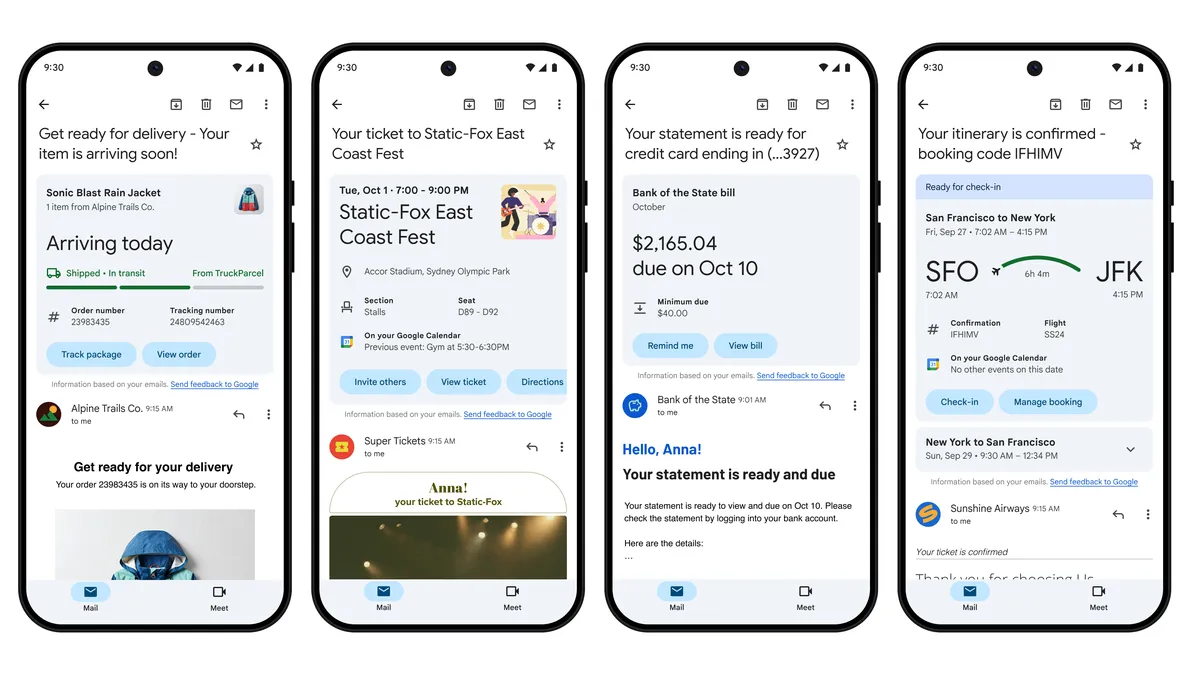
Gmail can also show other useful information. Google's Summary Cards help page lists order tracking, events, trips, bills, and offers. Display also depends on smart-feature settings and sufficient information in the email. A summary card is part of the email client's interface.
| Mechanism | What it does | What the sender can control |
|---|---|---|
| OTP recognition | May identify a code and offer to copy it | Email clarity. No public Copy code switch has been confirmed |
| Summary Cards | Summarizes orders, trips, and other events | Accurate, consistent information in emails |
| Email Markup / Highlights | Describes supported entities and actions | Markup, sender authentication, and the approval process |
| Gmail API | Provides authorized access to mailbox data | The app's OAuth integration and processing of authorized data |
Gmail Email Markup uses Schema.org and supported JSON-LD and Microdata formats for entities such as orders, deliveries, and reservations. It is not a way to declare an arbitrary OTP object and obtain guaranteed autofill. To launch marked-up emails, Google provides sender registration and email quality and authentication requirements. Valid JSON alone does not guarantee a special interface for the recipient.
In the documented Gmail API Message resource, the snippet field is a short text excerpt. It must not be treated as a ready-to-use OTP or a Summary Cards result. The documentation reviewed did not reveal a separate public method for retrieving a code or card recognized by Gmail. Workspace classification labels also do not mean that the API returns OTPs.
Build the message from booking data
Alex has booked a ceramics workshop for November 21, from 10:00 to 12:00 in Prague. The confirmation should answer four questions immediately: is the place confirmed, when should Alex arrive, where is it, and where is the ticket? Those answers must survive missing Gmail cards and blocked images.
The content the recipient sees in the demonstration email:
Booking WS-1042 confirmed
Hello, Alex Morgan.
Ceramics workshop
21 November 2026, 10:00–12:00 (Europe/Prague)
Example Studio
Example Street 12, 110 00 Prague, Prague, CZYour PDF ticket is attached.
All names, addresses, domains and booking details below are fictional. The demonstration email is in English in every language edition so that the code is identical. It is a Node.js module for a project that already has Nodemailer installed. It creates a local preview.eml without sending anything. Save the next two code blocks, in order, as email-demo.mjs.
import nodemailer from "nodemailer";
import { readFile, writeFile } from "node:fs/promises";
const booking = {
id: "WS-1042", name: "Alex Morgan", event: "Ceramics workshop",
start: "2026-11-21T10:00:00+01:00", end: "2026-11-21T12:00:00+01:00",
when: "21 November 2026, 10:00–12:00 (Europe/Prague)",
venue: "Example Studio", street: "Example Street 12",
city: "Prague", region: "Prague", postalCode: "110 00", country: "CZ"
};
const escapeHtml = value => String(value).replace(/[&<>"']/g,
c => ({"&":"&", "<":"<", ">":">", '"':""", "'":"'"})[c]);
const address = `${booking.street}, ${booking.postalCode} ${booking.city}, ${booking.region}, ${booking.country}`;
const text = `Booking ${booking.id} confirmed\n\nHello, ${booking.name}.\n${booking.event}\n${booking.when}\n${booking.venue}: ${address}\nYour PDF ticket is attached.`;
let html = `<!doctype html><html lang="en"><head>
<meta charset="utf-8"><meta name="viewport" content="width=device-width, initial-scale=1">
</head><body style="margin:0;padding:24px;background:#ffffff;color:#202020;font-family:Arial,sans-serif">
<table role="presentation" width="100%" cellpadding="0" cellspacing="0" border="0">
<tr><td>
<img src="cid:brand-logo@example.com" width="160" height="48" alt="Example Studio" style="display:block;border:0">
<h1 style="font-size:24px;line-height:32px">Booking ${escapeHtml(booking.id)} confirmed</h1>
<p>Hello, ${escapeHtml(booking.name)}.</p>
<p><strong>${escapeHtml(booking.event)}</strong><br>${escapeHtml(booking.when)}</p>
<p>${escapeHtml(booking.venue)}<br>${escapeHtml(address)}</p>
<p>Your PDF ticket is attached.</p>
</td></tr></table></body></html>`;booking supplies the text, HTML, Gmail metadata and calendar. In production, use a validated booking from your database and derive when from its date and timezone. Do not maintain that display string separately. escapeHtml makes a character such as < in a name remain text rather than becoming a tag. text is a readable alternative a client can select instead of HTML.
| Element | Purpose | Check |
|---|---|---|
h1, p, br, strong, a, ul, li | Text, hierarchy and links | Content makes sense without styling; actions use ordinary HTTPS links. |
table, tr, td | Predictable layout | Use role="presentation" for layout tables; retain semantics for actual data tables. |
img | Logo or illustration | Supply correct proportions, dimensions and alt text. Keep dates, prices and codes as text. |
| Inline CSS | Essential spacing, color and typography | Critical content does not depend on external CSS, flex/grid or background images. |
script, iframe, form | Avoid for ordinary email interaction | The JSON-LD block below is special-purpose data, not permission to execute JavaScript. |
This is a conservative starting point, not universal certification. Gmail supports some style blocks and media queries; that does not establish support in classic Outlook. Use the Gmail CSS reference to check a particular property. Test a received message on a narrow screen, in dark mode and with images disabled.
Attach a logo and PDF: HTML is only one part of the message
The HTML’s cid:brand-logo@example.com refers to a part inside the message. Nodemailer associates it with the PNG carrying that exact cid. The PDF remains a separate download. Append the second block and run node email-demo.mjs ./logo.png ./ticket.pdf with your own 160×48 PNG and a test PDF containing no personal data.
const [logoPath, ticketPath] = process.argv.slice(2);
if (!logoPath || !ticketPath) throw new Error("Pass a PNG logo and a PDF ticket");
const [logo, ticket] = await Promise.all([readFile(logoPath), readFile(ticketPath)]);
if (!logo.subarray(0, 8).equals(Buffer.from([137,80,78,71,13,10,26,10]))) {
  throw new Error("Logo is not a PNG");
}
if (ticket.subarray(0, 5).toString() !== "%PDF-") throw new Error("Ticket is not a PDF");
const message = {
  from: "Example Studio <booking@example.com>", to: "alex@example.com",
  subject: `Booking ${booking.id} confirmed`, text, html,
  attachments: [
    { filename: "logo.png", content: logo, contentType: "image/png",
      cid: "brand-logo@example.com", contentDisposition: "inline" },
    { filename: `ticket-${booking.id}.pdf`, content: ticket,
      contentType: "application/pdf", contentDisposition: "attachment" }
  ]
};
const previewTransport = nodemailer.createTransport({
  streamTransport: true, buffer: true, newline: "windows"
});
const result = await previewTransport.sendMail(message);
await writeFile("preview.eml", result.message);
Open preview.eml as a local file in a mail client: you should find the message, logo and PDF attachment. This checks message assembly, not delivery. The signature checks catch a mismatched file type, not a fraudulent PDF or a ticket belonging to another recipient. A file-read failure stops assembly, so the “ticket is attached” message is not generated without its file.
MIME packages several parts into one message. One suitable structure is shown below; the library produces the boundaries and encodings:
multipart/mixed
├── multipart/alternative
│   ├── text/plain; charset=utf-8
│   └── multipart/related
│       ├── text/html; charset=utf-8
│       └── image/png; Content-ID: <brand-logo@example.com>
└── application/pdf; filename=ticket-WS-1042.pdf
alternative offers two representations of the same content; related associates HTML with its image; mixed adds an independent document. Renaming a file .pdf is insufficient: bytes and Content-Type matter. Measure the encoded message because base64 adds roughly a third to file size. Generate each recipient’s own ticket; never send personal documents to a shared BCC list.
This logo appears inside the email body. A stable public HTTPS image can replace CID when publishing that image is appropriate, but clients can block either approach. A logo beside a promotion uses separate metadata below. A sender avatar through BIMI depends on domain configuration and provider requirements; a PNG in HTML does not enable it. Do not publish a private PDF just to obtain a convenient URL. See the API used here in Nodemailer attachments and stream transport.
Describe the reservation to Gmail
The reader sees “workshop, November 21, 10:00.” Metadata supplies the same facts in a machine-readable form: confirmed booking WS-1042 belongs to Alex and concerns an event at a specific address. Gmail may use those facts in its supported reservation experience. You are not drawing that interface yourself or instructing Gmail to add an event to a calendar.
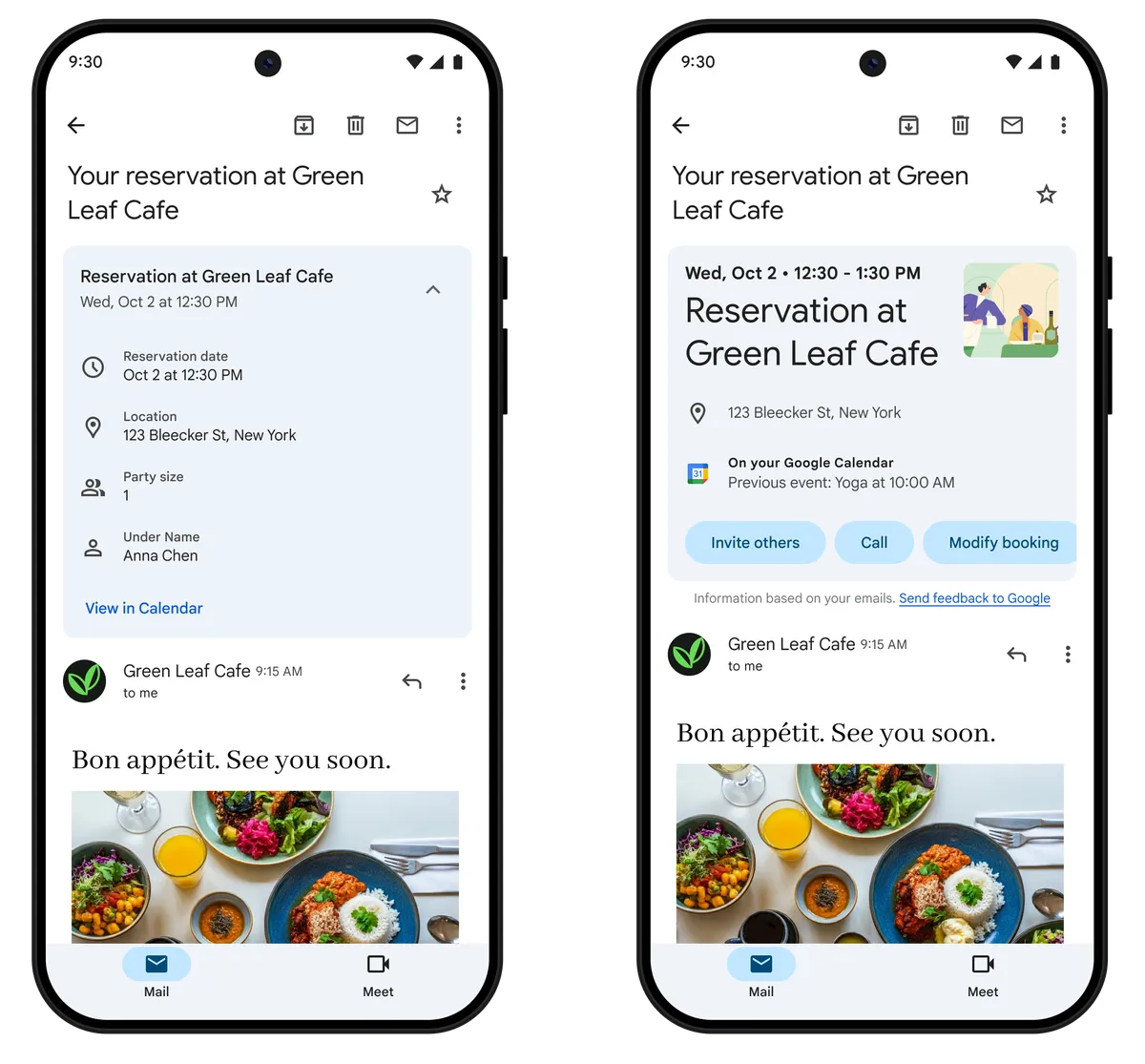
Insert this block between the first and second blocks above, before constructing message. It places JSON-LD in the email’s <head>. The JSON should not appear as visible message text. Editing your website’s SEO markup or attaching a separate JSON file does not perform this integration.
function emailJsonLd(data) {
  const json = JSON.stringify(data);
  if (json === undefined) throw new Error("Missing structured data");
  return '<script type="application/ld+json">' + json
    .replace(/</g, "\\u003c")
    .replace(/>/g, "\\u003e")
    .replace(/&/g, "\\u0026")
    .replace(/\u2028/g, "\\u2028")
    .replace(/\u2029/g, "\\u2029") + '</script>';
}
const reservation = {
  "@context": "http://schema.org", "@type": "EventReservation",
  reservationNumber: booking.id,
  reservationStatus: "http://schema.org/ReservationConfirmed",
  underName: { "@type": "Person", name: booking.name },
  reservationFor: {
    "@type": "Event", name: booking.event,
    startDate: booking.start, endDate: booking.end,
    location: {
      "@type": "Place", name: booking.venue,
      address: {
        "@type": "PostalAddress", streetAddress: booking.street,
        addressLocality: booking.city, addressRegion: booking.region,
        postalCode: booking.postalCode, addressCountry: booking.country
      }
    }
  }
};
html = html.replace("</head>", emailJsonLd(reservation) + "</head>");
reservationNumber identifies the booking; underName identifies its holder; reservationFor describes the event. +01:00 makes the November timestamp unambiguous. The full venue address is included because Google requires it for this type. If your database only has a city name, obtain the actual venue address first rather than guessing required fields. The EventReservation contract defines the fields.
An event name may contain quotation marks or a literal </script>. JSON.stringify creates valid JSON; replacing < with \u003c prevents a value from closing the HTML data block. Parsing the JSON restores the original name. Replacing JSON quotes with " would break it. This is the email JSON-LD format, not executable script.
Check four layers: parse the final JSON; compare its booking number, holder, time and address with the visible email; run the HTML through Email Markup Tester; inspect an actually received message. Google allows same-account sender/recipient self-tests, but SPF or DKIM authentication is still required. Production use has a separate registration process. A locally valid .eml does not establish working cards for customers. Follow the schema testing procedure and registration requirements.
Promotions: describe the offer, not a sign-in code
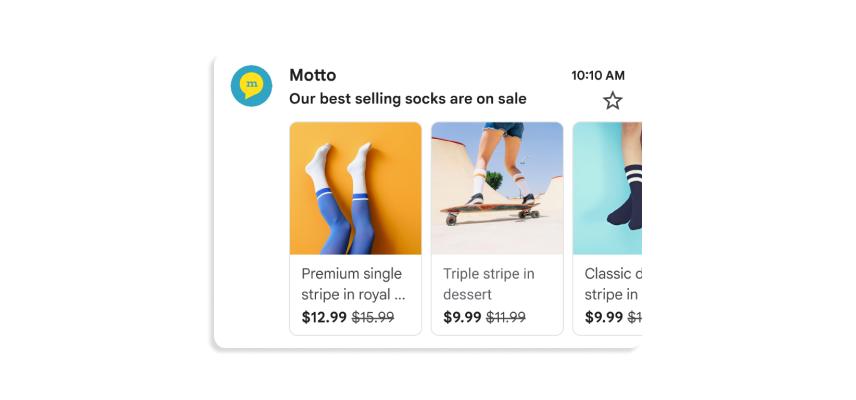
Consider a different message: the reader has not booked yet. You offer “€60 → €45, code CLAY15, until November 20.” An annotation describes the image, offer and expiry for Promotions. The same conditions belong in visible message text; subscription and unsubscribe handling remain part of your mailing system.
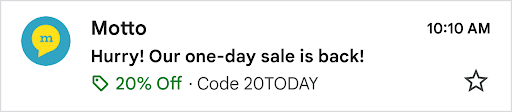
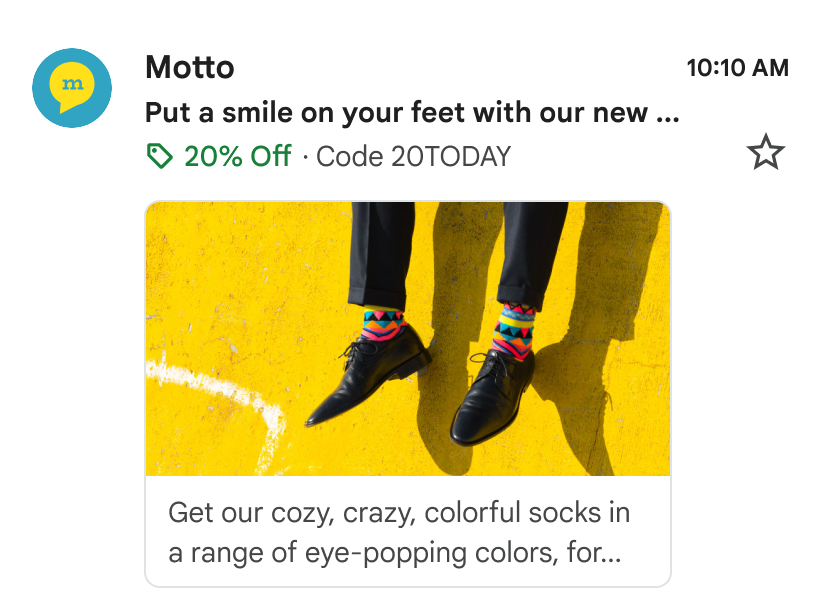
Use this object in a separate promotional email, not the booking confirmation. Reuse emailJsonLd. Every example.com URL is an illustrative placeholder; replace it with a verified public HTTPS asset or destination before sending.
const promotion = [
  { "@context": "http://schema.org/", "@type": "Organization",
    logo: "https://example.com/assets/logo.png" },
  { "@context": "http://schema.org/", "@type": "DiscountOffer",
    description: "Save €15 on the ceramics workshop", discountCode: "CLAY15",
    availabilityStarts: "2026-11-12T09:00:00+01:00",
    availabilityEnds: "2026-11-20T23:59:00+01:00" },
  { "@context": "http://schema.org/", "@type": "PromotionCard",
    image: "https://example.com/assets/workshop.jpg",
    url: "https://example.com/offers/ceramics",
    headline: "Ceramics workshop", price: "60", priceCurrency: "EUR",
    discountValue: "15" }
];
// In a separate promotional email, before building its message object:
html = html.replace("</head>", emailJsonLd(promotion) + "</head>");
price: "60" is the original price and discountValue: "15" is the amount subtracted: €45, not 15% off. Your checkout must accept CLAY15, and the server’s expiry must match availabilityEnds. PromotionCard requires an image and destination URL. Use a PNG/JPEG with a supported 4:5, 1:1 or 1.91:1 ratio. A CID image cannot replace the public image URL. Valid annotations neither select the inbox tab nor guarantee display. See the Promotions mechanism and field definitions.
event.ics: choose a calendar import or an invitation
A purchased workshop usually needs an “Add to calendar” link or an importable file. This creates a copy in the recipient’s calendar. Changing your database later does not ensure that copy updates. Accept/Decline responses, rescheduling and cancellation require an invitation exchange and reply processing, not merely a different filename.
Here is a minimal import file for our event. DTSTART:20261121T090000Z means 09:00 UTC, or 10:00 in Prague on that date. DTEND is the end; UID is the event’s persistent identity; DTSTAMP is the time the data was produced, not the workshop start.
BEGIN:VCALENDAR
VERSION:2.0
PRODID:-//Example Studio//Booking//EN
CALSCALE:GREGORIAN
BEGIN:VEVENT
UID:booking-WS-1042@example.com
DTSTAMP:20261112T120000Z
DTSTART:20261121T090000Z
DTEND:20261121T110000Z
SUMMARY:Ceramics workshop
LOCATION:Example Studio\, Example Street 12\, Prague
DESCRIPTION:Booking WS-1042\nBring your PDF ticket.
END:VEVENT
END:VCALENDAR
Use CRLF line endings and a final CRLF. Escape commas, semicolons, backslashes and newlines within text values. Fold long lines by UTF-8 bytes, not JavaScript character count: slice(0, 75) can break multilingual content. Add this code after constructing message and before previewTransport.sendMail:
const escapeIcsText = value => String(value).replace(/\\/g, "\\\\")
  .replace(/;/g, "\\;").replace(/,/g, "\\,").replace(/\r\n|\r|\n/g, "\\n");
function foldIcsLine(line) {
  let result = "", bytes = 0;
  for (const character of line) {
    const length = Buffer.byteLength(character, "utf8");
    if (bytes + length > 75) { result += "\r\n "; bytes = 1; }
    result += character; bytes += length;
  }
  return result;
}
const utc = value => new Date(value).toISOString()
  .replace(/[-:]/g, "").replace(/\.\d{3}Z$/, "Z");
const calendar = [
  "BEGIN:VCALENDAR", "VERSION:2.0", "PRODID:-//Example Studio//Booking//EN",
  "CALSCALE:GREGORIAN", "BEGIN:VEVENT", `UID:booking-${booking.id}@example.com`,
  `DTSTAMP:${utc(new Date())}`, `DTSTART:${utc(booking.start)}`, `DTEND:${utc(booking.end)}`,
  `SUMMARY:${escapeIcsText(booking.event)}`,
  `LOCATION:${escapeIcsText(booking.venue + ", " + address)}`,
  `DESCRIPTION:${escapeIcsText("Booking " + booking.id + "\nBring your PDF ticket.")}`,
  "END:VEVENT", "END:VCALENDAR"
].map(foldIcsLine).join("\r\n") + "\r\n";
message.attachments.push({ filename: "event.ics", content: Buffer.from(calendar),
  contentType: "text/calendar; charset=utf-8", contentDisposition: "attachment" });
Z indicates UTC. Store an IANA zone such as Europe/Prague for actual bookings and compute the offset for the event date: summer uses +02:00 here. Do not use the server’s timezone. Validate that end follows start and explicitly resolve nonexistent local times during daylight-saving changes. All-day events use VALUE=DATE; an end date of November 22 includes November 21 as the last day. iCalendar defines these data and line rules.
An invitation adds the following fields to the same event data. This is a change excerpt, not a complete file; the ellipsis stands for omitted lines. Use real organizer and attendee addresses. PARTSTAT=NEEDS-ACTION means no response yet; do not mark a person ACCEPTED on their behalf.
METHOD:REQUEST
...
UID:booking-WS-1042@example.com
SEQUENCE:0
ORGANIZER:mailto:events@example.com
ATTENDEE;RSVP=TRUE;PARTSTAT=NEEDS-ACTION:mailto:alex@example.com
Pair METHOD:REQUEST inside the calendar with Content-Type: text/calendar; charset=utf-8; method=REQUEST on its MIME part. Nodemailer provides icalEvent: { method: "REQUEST", content: requestCalendar } for this path. Use it instead of a regular calendar attachment, and keep the invitation free of extra PDFs and images that can interfere with recognition in some clients. requestCalendar must contain the complete valid calendar. The Nodemailer API packages it; it does not implement your scheduling system.
| Action | Send | Server state |
|---|---|---|
| Initial invitation | REQUEST, UID booking-WS-1042@example.com, SEQUENCE:0 | Organizer, attendee, time and current revision. |
| Move to 11:00 | REQUEST, same UID, SEQUENCE:1, new DTSTART/DTEND and DTSTAMP | Increase revision for the change, not every delivery retry. |
| Cancel after moving | CANCEL, same UID, SEQUENCE:2, STATUS:CANCELLED | Record cancellation and recipients; MIME method is CANCEL too. |
| Attendee response | REPLY, same UID, corresponding revision and attendee PARTSTAT | Verify sender and attendee, check the event revision, then store the response. |
iMIP, RFC 6047 binds calendar methods to email; iTIP, RFC 5546 defines scheduling exchanges. An incoming ATTENDEE field is not proof of identity. Even with a stable UID, test repeated import, updates and cancellation in the target calendars: successful parsing alone does not establish client behavior.
Find the layer that failed
| Symptom | Inspect | Fix |
|---|---|---|
| Missing logo | Compare HTML cid with Content-ID in the raw email; enable images. | Correct the CID or related packaging; retain a text brand and alt. |
| Missing promised ticket | Check PDF generation and application/pdf in received MIME. | Assemble only after generation succeeds; avoid false attachment promises. |
| No Gmail card | Check JSON-LD after provider processing, required fields and sender eligibility. | Repair that layer; changing font size will not fix metadata. |
| Event one hour early | Compare source date, IANA zone, offset and DTSTART. | Compute UTC for the event date; align text, HTML and ICS. |
| Duplicate after rescheduling | Compare the original and update UID. | Persist the UID and advance the event revision. |
Start with the local .eml, then an authorized test through the production provider, which may rewrite HTML, links or MIME. Check normal view, dark mode, blocked images, PDF downloads and ICS imports in Gmail, Apple Mail and the Outlook versions you support. For RSVP, run invitation → response → reschedule → cancellation. Record the client, version and outcome instead of a single “email works” verdict.
Choosing an approach for your product
| Scenario | Primary approach | Capability boundary |
|---|---|---|
| Website with its own SMS sender | Field semantics + domain binding. WebOTP where supported | Does not read all SMS messages or access email |
| Android, where the SMS can be changed | SMS Retriever API | Google Play services, message format, and app hash |
| Android, where a hash cannot be added | SMS User Consent API, if the scenario meets its requirements | Consent for one message, message-selection rules, and a waiting window |
| iPhone app | A oneTimeCode field and system AutoFill | The OS controls recognition and suggestion display |
| Code delivered by email | A clear email + a correctly configured field + available system suggestions | WebOTP is not an email-reading API |
| Assistant for third-party websites and apps | Permitted platform integrations with destination verification | A separate product with access to sensitive data |
This table describes integration approaches, not guarantees based on a phone's brand. For example, SMS Retriever belongs to Google Play services: the presence of Android alone does not establish that this mechanism is available. For devices without the required services, first check the specific platform's officially supported approach.
Websites: get the field right before adding WebOTP
For a numeric code, use a text field with a numeric keyboard. type="number" is unsuitable: a code is an identifier, not a number for calculations. Leading zeros must be preserved. web.dev's OTP form recommendations explain the combination of inputmode and autocomplete="one-time-code".
<form id="verify-form" action="/auth/verify" method="post">
  <label for="otp">Code from the message</label>
  <p id="otp-hint">Enter 6 digits. Leading zeros matter.</p>
  <input id="otp" name="code" type="text"
    inputmode="numeric" autocomplete="one-time-code"
    pattern="[0-9]{6}" maxlength="6" required
    aria-describedby="otp-hint otp-status">
  <p id="otp-status" role="status"></p>
  <button type="submit">Confirm</button>
</form>
Six digits is the explicit contract of this example. Alphanumeric codes need a different constraint and keyboard. The /auth/verify route is illustrative: server implementation, request protection, and binding to the sign-in attempt are not included in this snippet.
One real input is usually easier for pasting, editing, AutoFill, and screen readers than six independent fields. A design with six cells still needs to support entering the complete code, correct focus order, and an accessible name. Do not block pasting or force people to retype the digits.
WebOTP, as documented by Chrome, receives a specially formatted SMS bound to a domain. It requires a secure context and browser support. Safari may offer system AutoFill for suitable messages without implementing the same JavaScript API. Check the capability rather than the OS name.
Your Example sign-in code: 004291

@example.com #004291
The last line contains the exact domain without a scheme or path, followed by the code prefixed with #. Embedded frames have separate format and Permissions Policy rules. Check them against the WebOTP documentation. This example applies to an ordinary top-level page.
const form = document.querySelector("#verify-form");
const input = document.querySelector("#otp");
const status = document.querySelector("#otp-status");

if (form && input && status && "OTPCredential" in window) {
  const controller = new AbortController();
  const stop = () => controller.abort();
  form.addEventListener("submit", stop, { once: true });
  input.addEventListener("input", stop, { once: true });
  window.addEventListener("pagehide", stop, { once: true });
  const timer = window.setTimeout(stop, 60_000);

  navigator.credentials.get({
    otp: { transport: ["sms"] },
    signal: controller.signal
  }).then(credential => {
    if (!controller.signal.aborted && credential?.code && !input.value) {
      input.value = credential.code;
      input.dispatchEvent(new Event("input", { bubbles: true }));
      status.textContent = "Code filled in. Check it and confirm sign-in.";
    }
  }).catch(error => {
    if (error.name !== "AbortError") {
      status.textContent = "Enter the code from the message manually.";
    }
  }).finally(() => {
    window.clearTimeout(timer);
    form.removeEventListener("submit", stop);
    input.removeEventListener("input", stop);
    window.removeEventListener("pagehide", stop);
  });
}
Start listening before sending the expected SMS. In a real flow, coordinate this with the server request. This example cancels waiting on manual input, form submission, or leaving the page, does not overwrite an entered code, and does not submit the form automatically. The 60-second wait is an interface setting, not the OTP's lifetime. The same manual entry remains available if the API is absent, the user declines, or the wait times out. In an SPA component, also cancel waiting when the component unmounts.
Android: Retriever, User Consent, and AutofillService solve different problems
A practical Retriever sequence is: create a verification attempt; start listening in the app; after successful startup, ask the server to send; send the code with the app hash; receive the result; submit the code and attempt to the server. Each step can fail separately. A wrong release hash prevents app retrieval while the SMS still arrives on the phone, so delivery alone does not prove Retriever integration.
SMS Retriever API binds a message to an app using a hash. The team agrees on the SMS format with the server, starts listening before sending, and checks the message after receipt. This enables verification without general permission to read SMS messages.
The client entry points are SmsRetriever.getClient(context).startSmsRetriever() and startSmsUserConsent(senderAddress). The SmsRetrieverClient reference describes SMS_RETRIEVED_ACTION, statuses, and receiver protection with SEND_PERMISSION. Starting the listener successfully does not mean a message has arrived. User consent is handled separately from delivery.
Implementation requires a Google Play services dependency, a correctly configured receiver, and success and timeout handling. The hash must match the package identifier and signing certificate: a working debug build does not prove that a store release works. Send the received code to server verification for the specific attempt. Do not treat receiving an SMS as a successful sign-in.
If adding a hash is not possible, consider the SMS User Consent API. The user consents to sharing the text of one message with the app. This is a significant addition to the simplified rule that “a third-party SMS can only trigger a system suggestion,” but it is not permission to collect arbitrary messages.
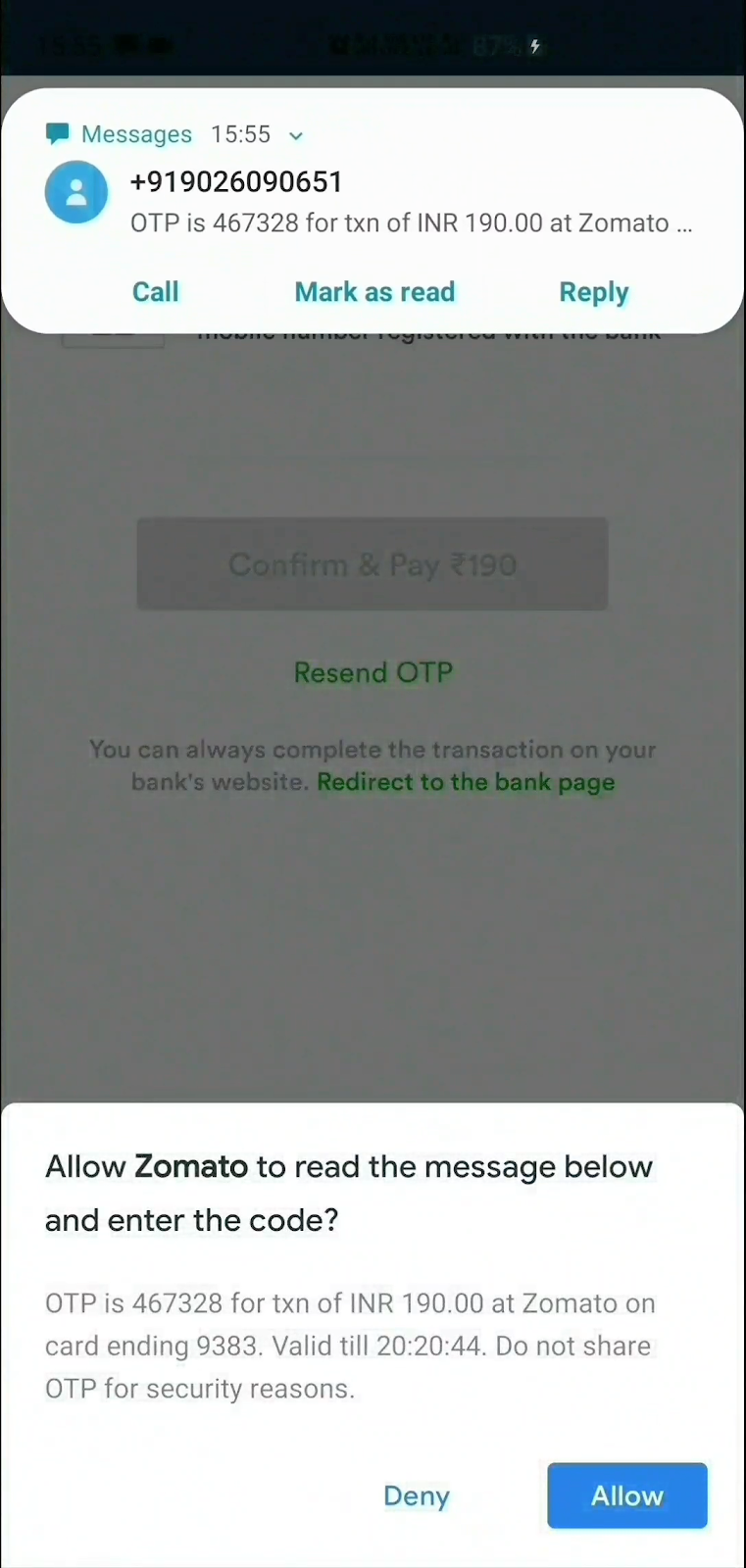
The User Consent message-selection rules require an alphanumeric code of 4–10 characters containing at least one digit. The sender must not be in the user's contacts. The documentation describes a five-minute listening window. These are API operating parameters, not a mandatory length or lifetime for your OTP. Declining consent must leave manual code entry available.
AutofillService is the role of a separate autofill provider, such as a password manager, enabled by the user in system settings. For an ordinary app accepting its own code, this is usually a different scope of work. The SMS Code Autofill API also serves the autofill-provider scenario. It is not permission for any app to intercept SMS messages.
Reading notifications is an unreliable basis for a universal code collector. In Android 15, notification content containing a detected OTP is hidden from untrusted NotificationListenerService implementations. User-granted notification access does not remove this restriction. Do not design a product around bypassing the protection.
iPhone: mark the field and let the system handle recognition
Email codes can also be filled without third-party app notifications. The iOS 17 feature guide documents AutoFill from Mail into Safari. The same mailbox accessed in Apple Mail and in the Gmail app does not imply the same recognition path. Test the actual client, settings, and destination field for your email.
In the official iOS 26 feature list, Apple lists Verification Code AutoFill from Notifications: codes can be filled from app notifications. This is a system capability, not an API allowing your app to read Gmail or messenger notifications.
UIKit uses UITextContentType.oneTimeCode. SwiftUI uses the corresponding field modifier:
TextField("Verification code", text: $code)
    .textContentType(.oneTimeCode)
    .keyboardType(.numberPad)
The keyboard setting suits numeric codes only. The required suggestion's availability depends on the recognized message, settings, and device state. For your service's SMS messages, Apple describes domain binding. Associated domains also matter for apps. A web field with autocomplete="one-time-code" and the native oneTimeCode express the input's purpose, but do not guarantee a suggestion from every source.
Test notification settings and hidden previews separately. If the code is absent from content available to the system, do not assume the feature will retrieve it from a private inbox. The app gains no right to read other apps' notifications. TOTP from a password manager is another separate source and should not be confused with a code delivered by email.
A universal assistant is a separate product
Improving your checkout and building an assistant for every website are projects of different scope. For the latter, first define where it operates: a browser extension, the selected Android autofill provider, an email client, or a permitted platform extension. A website cannot turn itself into a system-wide code manager across the phone.
The Gmail API with OAuth can give an app authorized access to email content. But that is access to mailbox data, not a narrow request to “return the expected code.” In the Gmail OAuth scopes list, reading email requires restricted scopes. Study the app verification requirements and, where applicable, security assessment requirements before implementation. For your own OTP screen, requesting access to an entire inbox is usually disproportionate to the task.
Another email provider requires its own supported integration and the user's consent. Do not promise identical behavior across every client merely because both display push notifications. The platforms reviewed have no public universal interface for “all OTPs from every channel.”
If such a product is justified, bind each detected message to a specific request: the account, exact domain or verified app identity, purpose of the action, and time window. Matching the sender name, subject text, and last six digits is insufficient. When ambiguous, do not guess: show the context to the person or decline automatic transfer. Address verification, sign-in, and money transfers must not be grouped together merely because they use the same code format.
What should happen after autofill
Suppose the user requests code A, taps Resend, then receives B. If your policy invalidates the previous code, reject A even if it arrives later and AutoFill chooses it first. Bind verification to the attempt, recipient and purpose; enforce expiry, attempt limits and single use. Check and consume the code atomically so two concurrent requests cannot accept it twice. Autofill changes the field; the server creates a session only after successful verification.
The server stores the attempt's state: who the code was issued to, why and when, when it expires, how many checks were made, and whether it has been used. Verification must account for this context, limit guessing and resends, and atomically invalidate the code after successful use. Define the policy for old codes after a resend in advance and reflect it in the interface. An on-screen timer does not replace server-side expiry.
Do not record OTPs, email content, or SMS content in analytics, console logs, or error messages. You can measure attempts, delivery latency, resend frequency, and verification outcomes without the secrets themselves. Distinguish “code suggested,” “field filled,” and “server confirmed the action”: they are separate events, not one successful-sign-in metric.
The interface should preserve entered text during temporary network errors, explain expiry, allow the address or number to be corrected, and allow resending after a clearly explained limit. Do not clear the field after every failure or announce “incorrect code” when the request never reached the server. Automatic filling must not interfere with manual pasting or unexpectedly change digits already entered.
Pre-release testing
| Situation | Expected result |
|---|---|
| The code starts with zeros | Zeros survive typing, pasting, and submission |
| The message arrived before listening began | The user can enter the code. The interface does not hang |
| Different domain, account, or purpose | Matching digits alone do not trigger automatic transfer |
| The user denied access | The same flow can be completed manually |
| Resend and an old code | The explicitly defined server policy applies |
| Manual entry while waiting | Late AutoFill does not overwrite entered text |
| Network failure, expiry, reuse | Clear, distinct states and correct server verification |
| Keyboard, screen reader, enlarged text | The field has a name, errors are associated with it, and focus does not jump |
| Android release signing and target devices | The actual integration is tested, not just a debug build |
The matrix must cover channels and implementations: your service's SMS, email, a supported WebOTP browser, Safari, target Android devices with the required services, and iPhones with a suitable OS version. Separately test concurrent attempts, account switching, leaving the page, and missing notifications. “Works on iOS” does not replace recording the version, settings, and tested scenario.
A skill for email development
Based on this research, we created a dedicated Email Development skill for Codex and Claude Code. It helps create and improve emails, from subjects and plain-text alternatives to HTML templates, OTP messages, Gmail structured data, and email-client verification.
The skill inspects existing templates, data, and the sending provider. For verification codes it considers message clarity, expiry, leading zeros, the sign-in attempt, and actual AutoFill limits. For orders and reservations it helps choose supported markup and check Gmail eligibility. It does not promise to force Copy code to appear or gain access to someone else's mailbox.
Install in Codex:
$skill-installer install https://github.com/wladislaw353/agent-skills/tree/main/skills/email-developmentInvoke it with $email-development. The Claude Code installation guide covers installing and updating the collection. With the plugin, use /agent-skills:email-development. With a manual installation in ~/.claude/skills/, use /email-development.
Example request: “Analyze our verification emails. Improve the HTML and plain-text alternatives, check accessibility, compatibility, and Gmail capabilities, and prepare the result for review.” The skill supports analysis and implementation. Sending emails and changing domain configuration require a separate instruction.
The expanded skill also includes a tag/CSS compatibility preflight, MIME attachment checks, body logos versus Promotions and BIMI, safe JSON-LD generation, and the lifecycle of event.ics invitations. Each check distinguishes validated output from features that still need a real mail-client test.